


Mon - Sat: 9:00 AM - 6:00 PM
LeadLocate CRM: Features and Product Walkthrough
Leads, texting, calls, email, follow up automation, desking, websites, team tools and reporting in one login, and the same login opens SecureWebX, Inventory Link and DealTracker.
- Month to month, no long term contract
- Desktop plus iPhone and Android apps
- No DMS or inventory feed needed to start
- Training and support on every plan
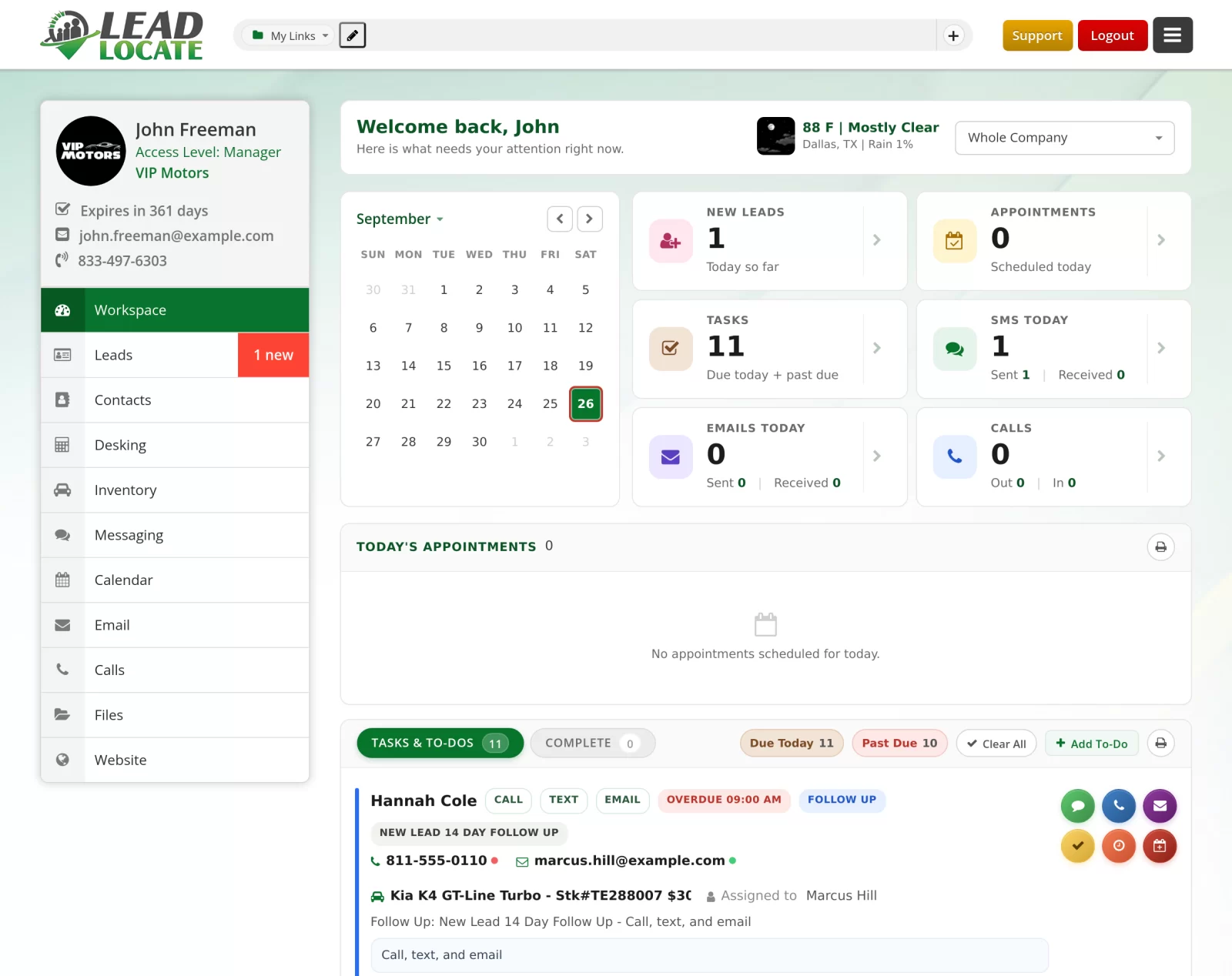
Explore the CRM module by module
The same menu your team works from every day

Leads
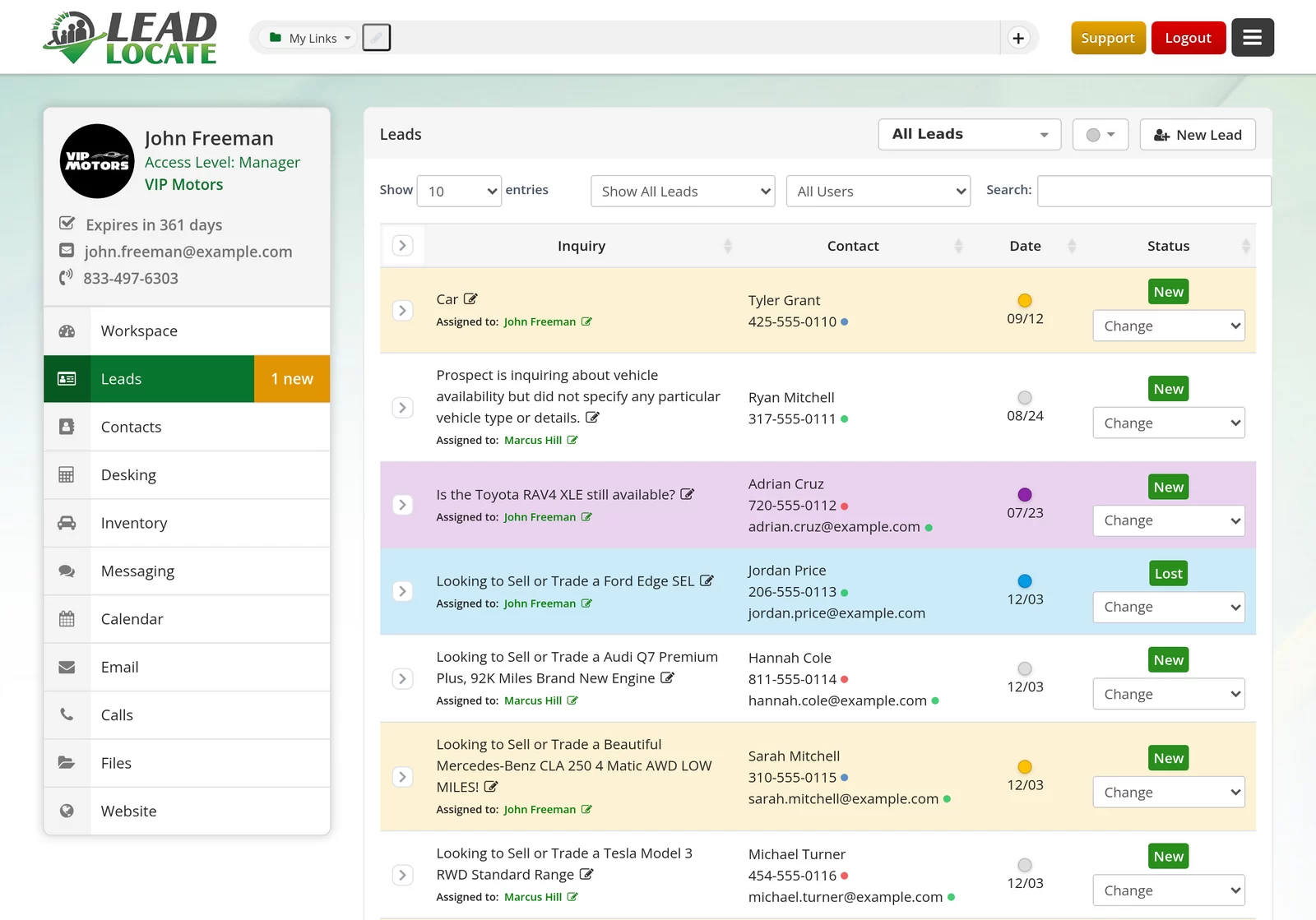
The lead inbox is where the day starts. Every lead lands the moment it arrives, autosaves as your rep types, and carries its own status, color and tags. Lead Feeds Manager gives each source its own feed and distributes by round robin, distribution list or rooftop.
- Instant intake from every source you sell from
- Custom statuses, row colors and tags per store
- Duplicate leads merged into one record
- Lost reason popup for cleaner month end reports
Contacts
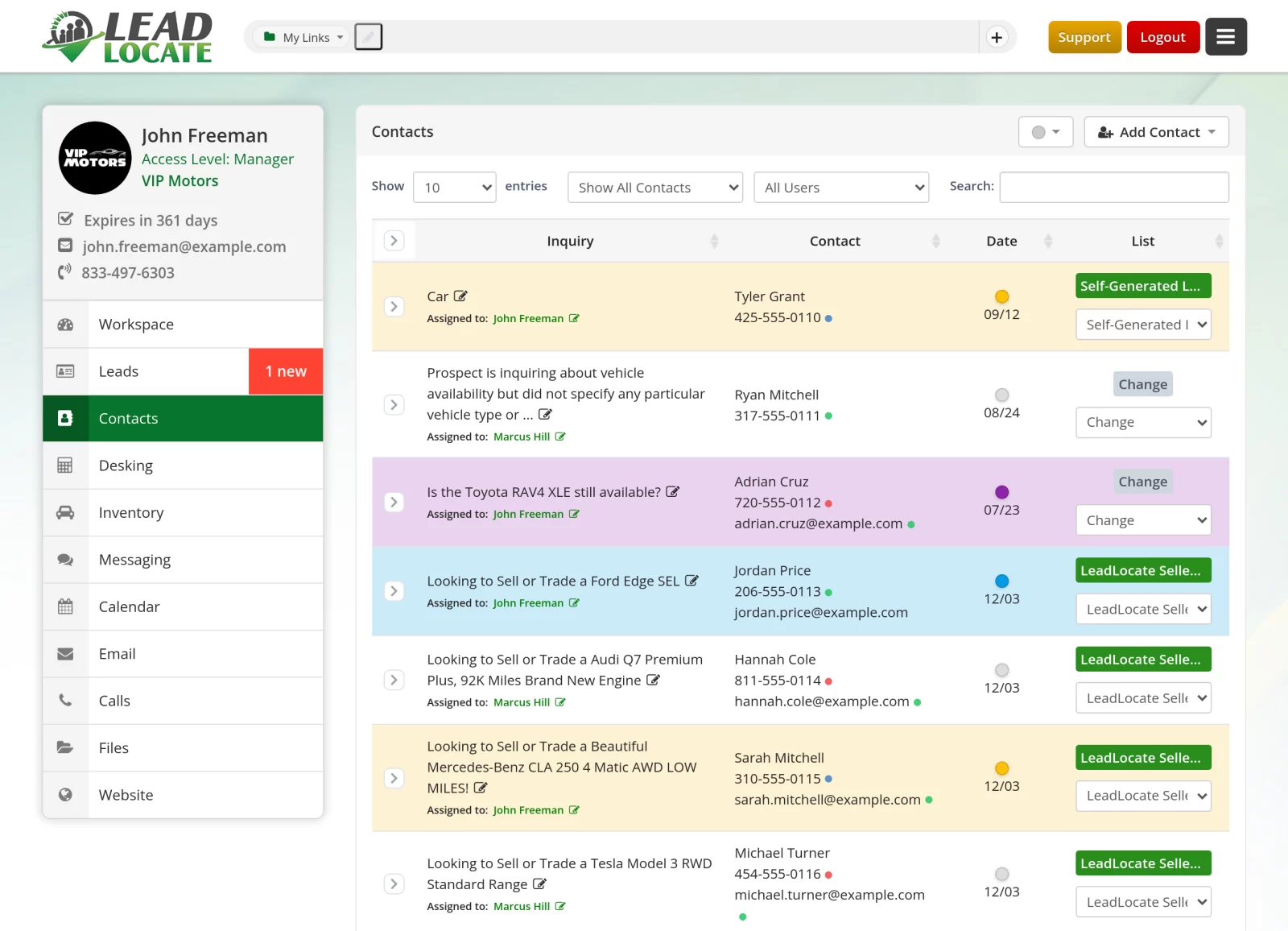
Contacts hold everyone who is not yet a lead, from past customers to your own personal network. Bring in the list you carry over from your last system, color code it, assign it and turn any contact into a working lead when the moment is right.
- Contact import brings your whole list along
- One shared Customer Profile with co-buyer details
- Personal information stored encrypted
- DNC Blacklist blocks a number in both directions
Desking
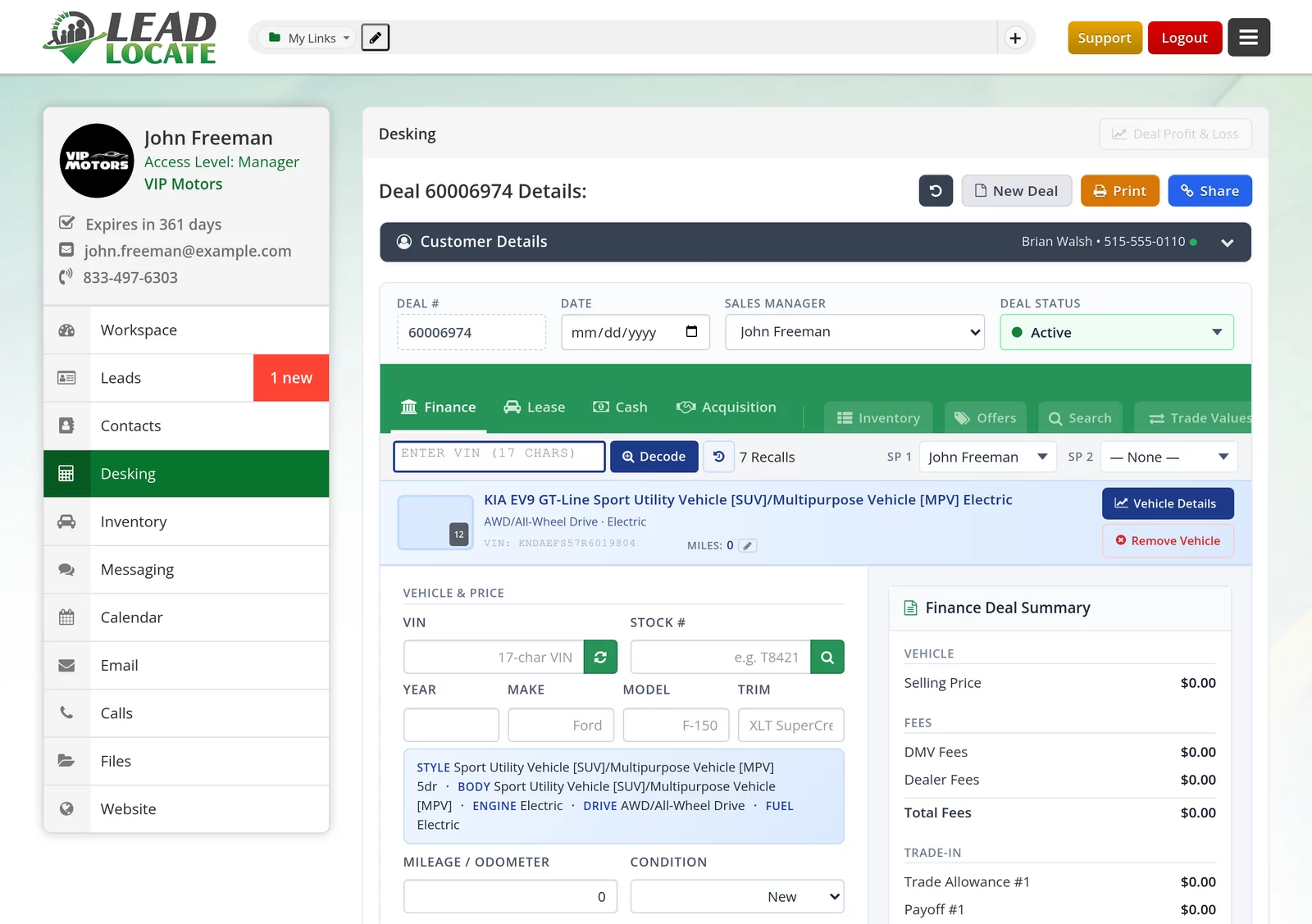
Desking is the DealTracker engine, on the main menu and not behind a separate purchase. Structure cash, finance and lease deals with a multi pencil grid, then send the customer a branded deal page they can review and sign on their own phone.
- Multi pencil grid with goal seek bays
- Fifty state tax matrix and three lease tax methods
- Road to Sale checklist and Deal Jacket
- OEM incentives inside the Incentives Showroom
Messaging
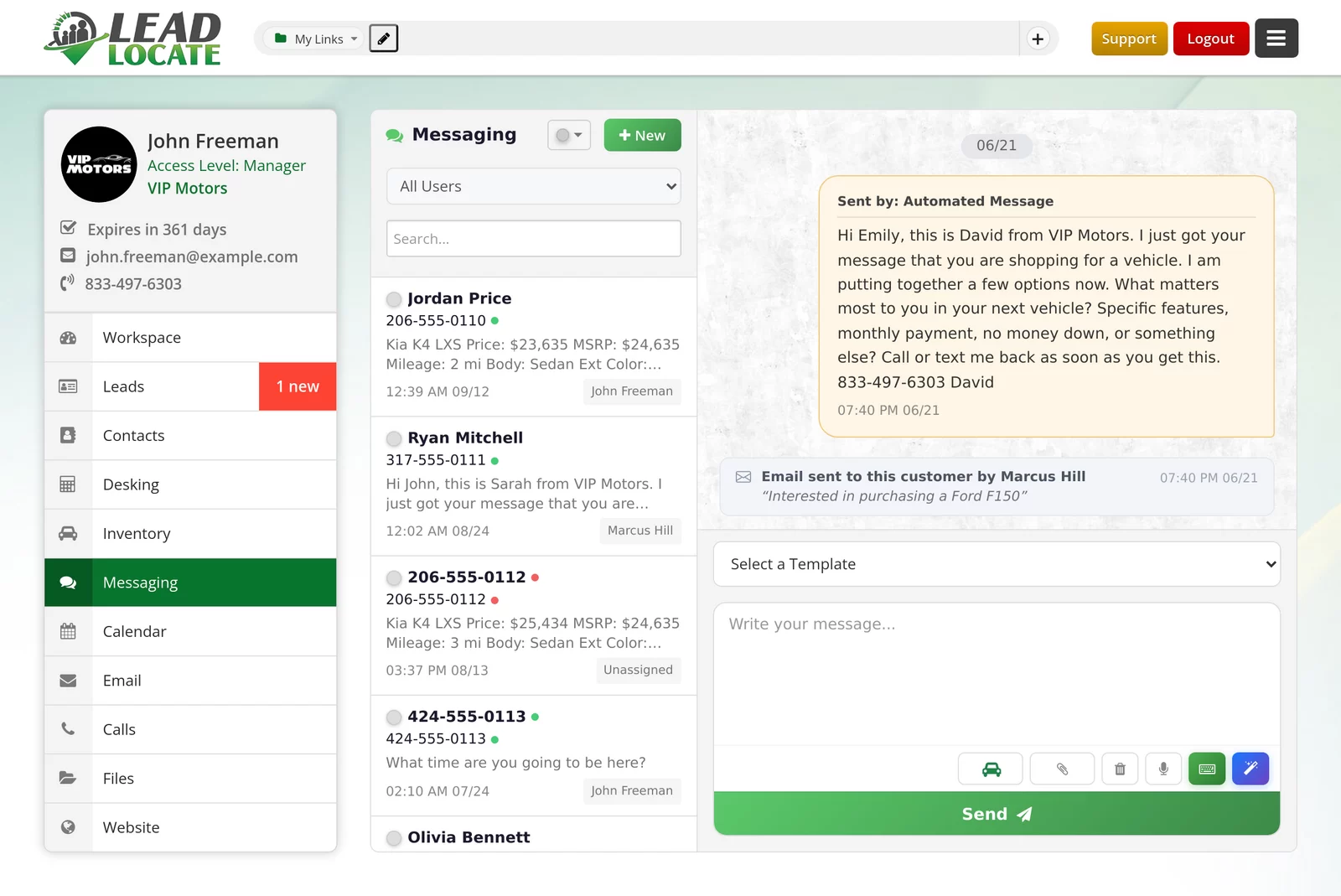
The SMS inbox shows every thread with sent, delivered or failed on each bubble, so nobody wonders whether the customer saw it. Send pictures, attach a vehicle from your inventory with a tap, and let RCS carry the message where the phone supports it.
- MMS with pictures and multiple attachments
- RCS messaging with automatic SMS fallback
- Trackable short links that report every click
- AI writing assistant and voice dictation
Calls
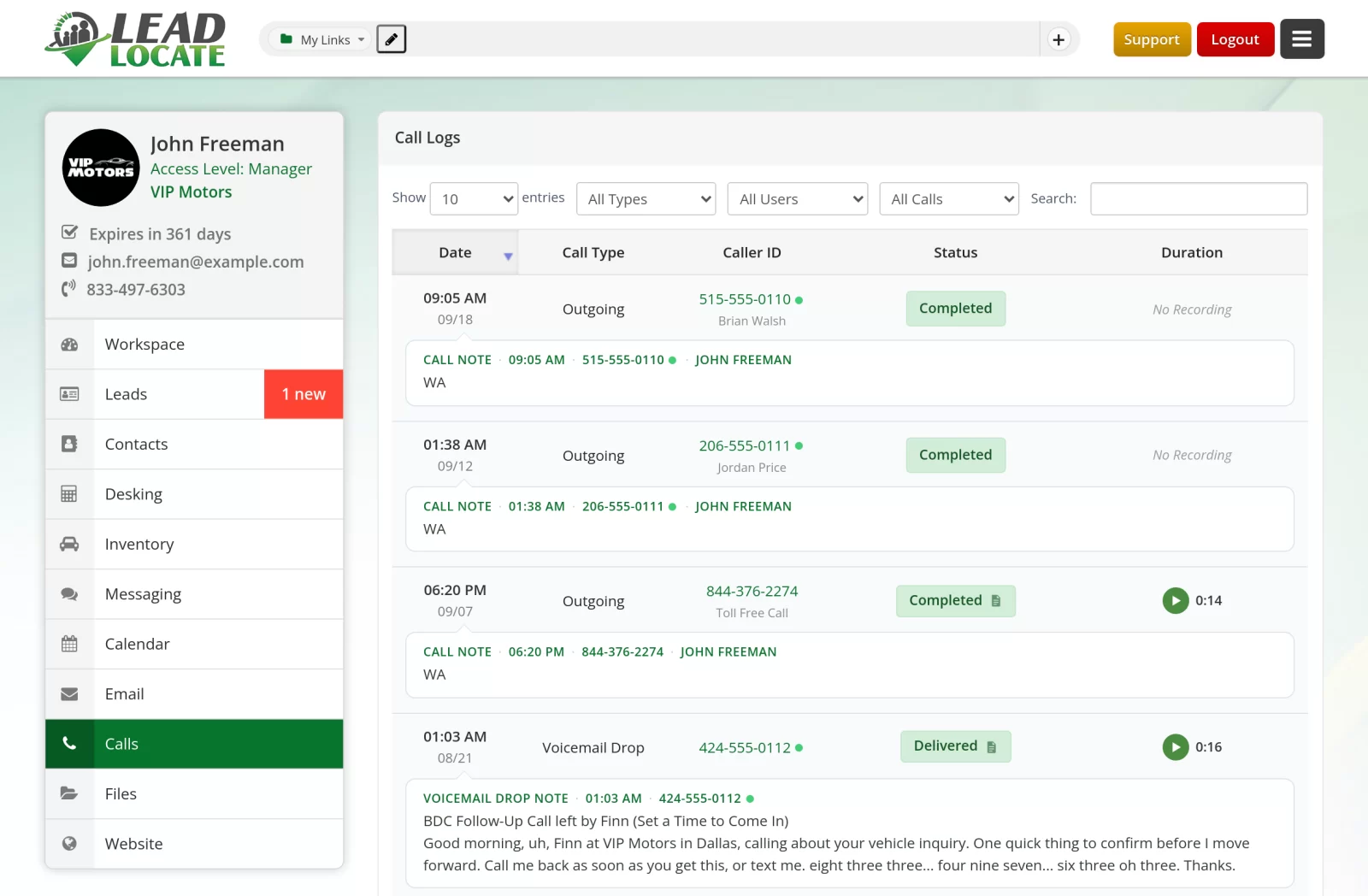
A VoIP softphone runs right in the browser. Click to call from any record, and every call is logged against the lead with its recording and a transcript that opens beside it. Tracking numbers are set up per source and forwarding rings the people you choose.
- Click to call from any lead, contact or deal
- Recordings with transcripts on every call
- Forward Calls To list built from your own users
- Virtual receptionist with hours you control
Website
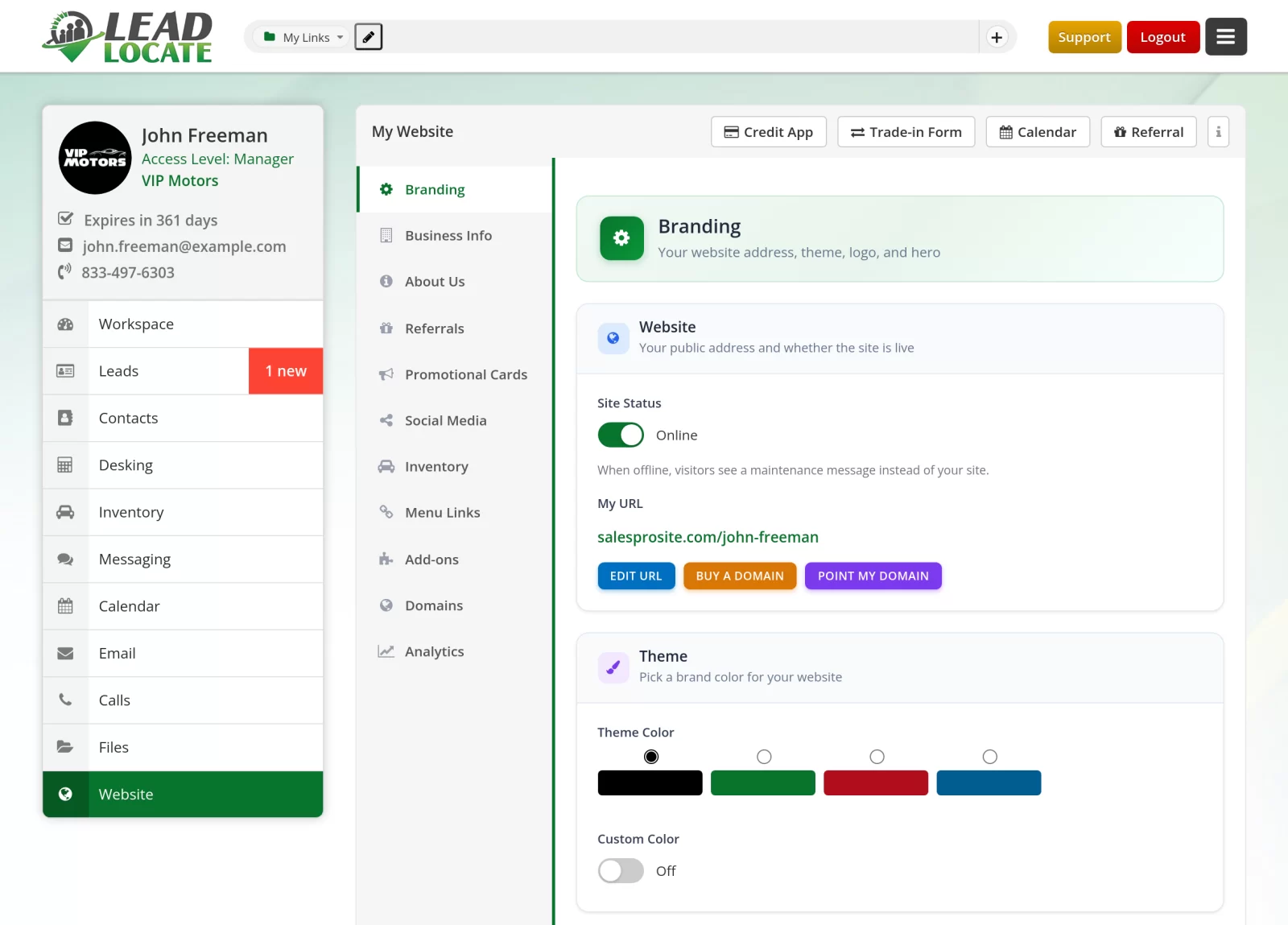
Every user gets a personal website with a public address, a theme color and the store's branding. Add landing pages, a live chat widget and a credit application link, then watch the visitor analytics without opening a second account.
- Landing page builder with per page URLs
- Personal salesperson websites
- Domains to search, buy and point yourself
- Free live chat widget for your dealer site
Automation
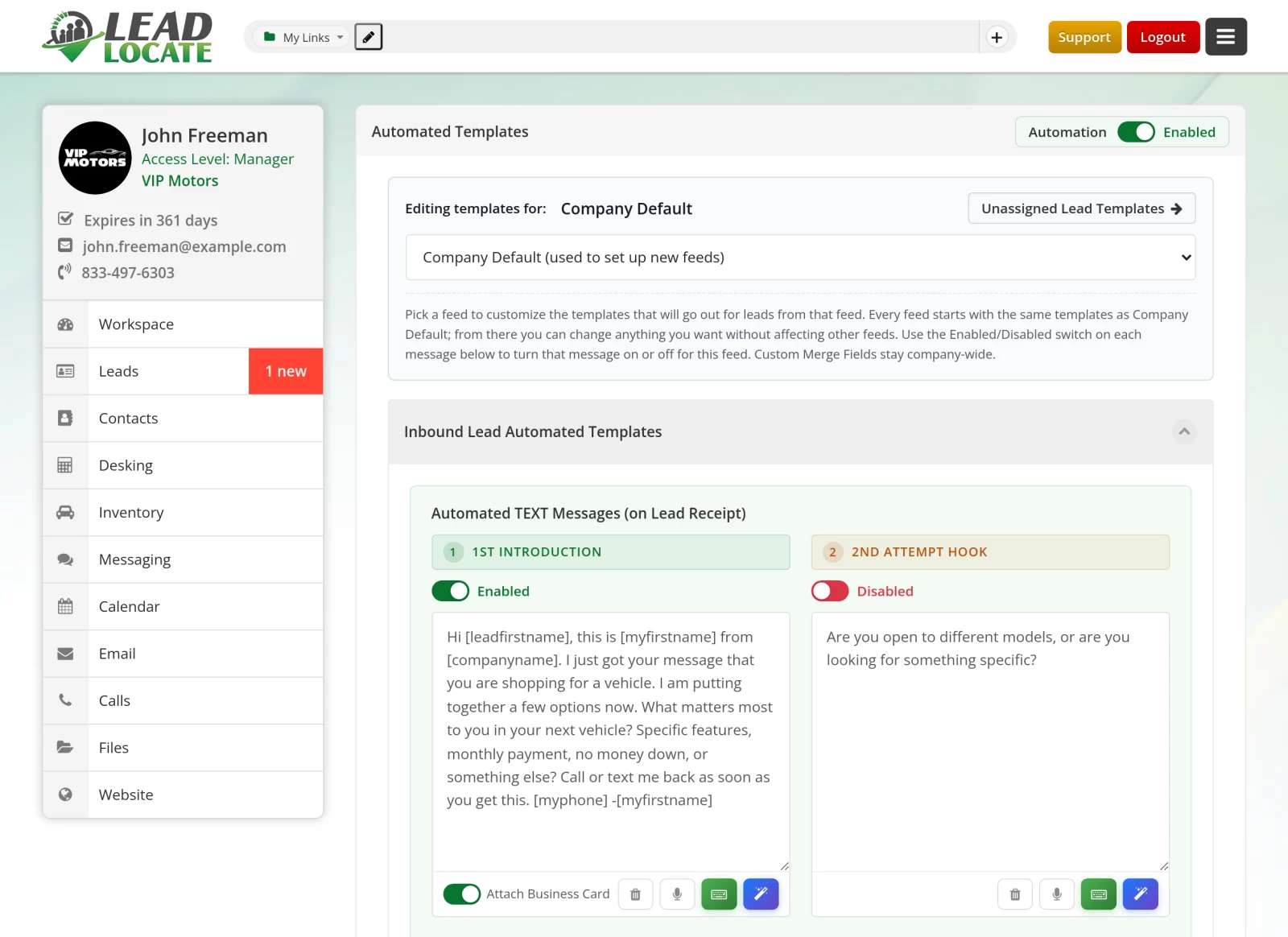
Automated Templates send the right first message for every lead source the second a lead arrives. Follow Up Processes then keep each lead moving with multi step drips, and your Workspace turns the whole thing into a simple list of what to do next.
- A template set for every lead feed
- Multi step follow up by lead type
- Merge fields that personalize every message
- Reminders, snooze and bulk clear in Workspace
What makes LeadLocate CRM different
Every tool a dealership sells with, built as one system

Every module behind one login
Leads, texting, calls, email, automation, desking, websites and reports open from the same sign in, next to SecureWebX and Inventory Link.
Texting and calling built in
A texting inbox with delivery status and a browser phone with recorded calls come with the CRM, so nothing else has to be bought or connected.
Desking on the main menu
The DealTracker desking engine sits beside your leads, so the number your rep builds is the number the customer signs.
Leads land and get worked instantly
Each source gets its own feed. New leads push into the CRM in real time and round robin puts them in front of the next rep.
Runs right beside your DMS
Start the day you sign up. Accounting and contracts stay in the DMS you trust while the CRM handles every customer conversation.
Compliance kept on the record
A live do not call lookup, a full communications log, call recording and encrypted customer profiles come standard.

What LeadLocate CRM is, and who runs on it
LeadLocate CRM is the customer relationship system at the center of the LeadLocate platform. Every lead, text, call, email, appointment, deal and report for your store lives in one login, and that same login opens SecureWebX, Inventory Link and DealTracker. The rest of this page walks through it module by module, using the names you see on screen.
It runs in the browser at the desk and as the LeadLocate app on the phone. The main menu reads Workspace, Leads, Contacts, Desking, Inventory, Messaging, Calendar, Email, Calls, Files and Website. The dock along the bottom carries My Office, Marketing Tools, Referral Program, Design Studio, My Inventory, SecureWebX, Reports, Feedback, More Options and Jax. If you have only seen the lead inbox, you have seen about a tenth of it.
Franchise stores run lead intake, communications and desking here, beside the DMS they already own. Independent lots get the same toolset. Buy here pay here operations desk on a field set built for them. Auto brokers work without a lot or a feed, and individual salespeople run their own website, booking link and follow-up under their own name. An inventory feed and DMS access are optional, and when you do have a feed, Inventory Link takes it and your actual units appear in every text and email composer.
- Franchise stores
- Independent lots
- Buy here pay here operations
- Auto brokers and individual salespeople
A day in LeadLocate CRM
Follow one customer from the first text to the signed deal
The lead arrives
Lead Feeds Manager takes the lead in from its own feed and pushes it into the CRM instantly. Round robin assigns it, and your rep gets the alert on the desktop and on the phone.
Lead Feeds ManagerThe first text goes out right away
The automated template for that lead source fires in seconds, so the customer hears from your store while the car is still on their mind.
Automated TemplatesThe conversation keeps moving
Your rep texts pictures of the unit, calls from the browser with the call recorded and transcribed, and sends an email from the same record.
Messaging and CallsFollow up runs itself
Follow Up Processes place the next task on the calendar and in Workspace, so no lead goes quiet because a day got busy.
Follow Up ProcessesThe visit gets booked
The customer picks a time on the rep's booking link. The appointment lands on the shared calendar and a confirmation goes out.
CalendarThe deal is desked and signed
EZ Desking pencils the deal, the customer reviews it on a branded deal page, and the signed result stays on the same customer record.
Desking
One customer record from first text to signed deal
Every lead, message, call, appointment and deal stays in your account, so your next sale starts right where the last one ended.

Leads and contacts: the menu you work from every day

Leads is where the day starts. The lead inbox and lead detail autosave in real time, so a note typed while the customer is still on the phone is on the record when the manager opens it. Each lead holds up to five vehicles of interest plus trade-in lines. Your store sets its own custom lead statuses, row colors and tags, keyword triggers act on what a customer texts back, and a lost reason popup captures why a deal died, so the month end report says more than "lost".
Lead Targeting, the lead feeds manager in the admin menu, is the intake side. Each source gets its own feed, custom source feeds cover the rest, and new leads push into the CRM instantly. Every account has its own form intake link, so any website form can create a lead with the fields mapped. Distribution is rules based: round robin across the team, global distribution lists, routing rules per rooftop, and Manager Lead Copies that send a manager every lead a feed delivers. Duplicates merge into one record, and the Customer Profile keeps one shared buyer record, co-buyer included, with personal information encrypted.
Contacts hold the people you know before they become leads. Smart Contact Import reads XLSX, CSV, JSON, ADF and vCard files and maps the columns for you. The DNC Blacklist blocks a number in both directions and runs a live do not call lookup. Quality Control Requests let a rep report a bad lead for a replacement review, decided on the record. The Trash Bin restores what somebody deleted, and the In-Store Now flag tells the whole floor who is on the lot.
Every lead worked the moment it lands
- Lead inbox that autosaves in real time
- Keyword triggers on customer replies
- Quality Control Requests with replacement review
- In-Store Now flag for the whole floor

Questions? Request a Call Back
Leave your number and a lead specialist calls you back to answer your questions about pricing, coverage, and setup. Mon - Sat, 9:00 AM - 6:00 PM Pacific.
Prefer to talk right now? Call or text 844-376-2274.
Everything inside LeadLocate CRM
Open any tool to see how it works

Texting, email and the phone system inside LeadLocate CRM
The top bar of every screen starts with Send a Text, Make a Call and Send an Email, and each one is a working tool. The SMS inbox shows delivery status on every bubble: sent, delivered or failed. MMS carries pictures and attachments, and RCS messaging runs where the customer's phone supports it, with automatic SMS fallback. The vehicle button in every composer attaches a unit with photos and price, and several vehicles go out as one text per vehicle, in order. Trackable short links report who clicked. The AI writing assistant drafts texts and emails on request, and voice dictation lets a rep talk instead of type.
Email has its own inbox, composer and archive, plus campaigns, Bulk Email and drips. Email domain authentication sends from your store's own domain. The Email Validator and Phone Validator show their results as validity dots right on the lead.
The phone system is built in. A VoIP softphone runs in the browser, click to call dials from any record, and a call can ring a physical desk phone instead. Calls are recorded and transcribed, and Alert Keywords flag the calls where a customer said the words you chose, such as "trade in" or "payment". Tracking numbers are provisioned per source. Forward Calls To rings a list of your own users, the virtual receptionist and an IVR call flow builder handle the front door, and business hours routing covers after hours. Voicemail drops carry a short script per lead by topic (new lead, appointment reminder, no show, trade, finance), voiced in a natural voice, and every topic has a Spanish twin.
The Marketing Tools menu on the dock collects the campaign versions: Bulk Texting, Texting Chatbots, Text Automation, Voicemail Drops, Phone Validator, Bulk Email, Email Automation and Email Validator. The car dealer CRM page goes further into the calling and texting side.
Talk to customers where they are
- Texting with delivery status on every bubble
- Browser phone with recorded calls
- Email from the store's own domain
- Email and phone validators on every lead
Built for every seat in the dealership
Pick a role to see its day in the CRM
Salespeople
Your day starts in Workspace and ends with nothing left undone. Leads arrive with an alert, texts and calls happen from the same record, and the mobile app keeps every follow up in reach from the lot.
- Alerts on the desktop and the phone
- Text, call and email from one record
- Quick Schedule books a visit in a few taps
BDC agents
Answer every lead in seconds with templates, a browser phone and a shared calendar. Follow Up Processes and reminders make sure every conversation gets its next step.
- Automated Templates for every lead source
- Browser phone with recorded calls
- Booking links and team availability
Sales managers
See every conversation, follow every deal and get a copy of every lead. Round robin keeps distribution fair, and reports show who is selling and what is working.
- Manager copies of every lead
- Round robin and distribution lists
- Activity and management reports
F&I managers
Credit applications, stipulations and worksheets live in SecureWebX, launched from the same login. A worksheet penciled in desking can be pushed straight across.
- SecureWebX one tap from the dock
- Worksheets pushed from desking
- Encrypted applications with an audit log
General managers
One bill and one login for the tools the whole store runs on. Reports, call alerts and the communications log show the whole operation without asking anyone.
- Company and management reports
- Call recording with alert keywords
- Roles, PINs and per user notifications
Auto brokers
No lot and no feed needed. Brand offer pages, desking and customer deal pages work from the first day, under your own name and website.
- Personal website and booking link
- Desking for cash, finance and lease
- Customer deal pages with e-signature
Choose the plan that fits your store
Month to month service with the full CRM on every plan
REAL-TIME
INBOUND LEADS
Month-to-Month Service
✅ Inbound Plans include integration with our advertising feeds that generate leads for you.
Generate fresh sales leads, get a personal website, capture leads through a referral link, automate marketing, and more.
MARKETPLACE
ACQUISITIONS
Month-to-Month Service
✅ Acquisitions Plans include 40-60* offer requests from local car sellers every month.
Includes everything you need to buy vehicles direct from local owners who asked for an offer, then retail or wholesale them.
BUYERS & SELLERS
HYBRID PLAN
Month-to-Month Service
✅ Hybrid Plans include 40-60* buyer leads and 40-60* seller leads every month.
Buy cars from local owners and sell to in-market buyers, with both lead types in one CRM pipeline.

Automation, scheduling and desking with DealTracker
Automated Templates are the inbound responses: a template set per lead feed, a master set, and automation for leads that land unassigned. Follow Up Processes are multi step drips per lead type, with a restore defaults control. Intake Process Automation replaces the third-party automation tools stores used to pay for separately. Scheduled Messages adds Messaging, Email and Voicemail Automation windows: write a text, email or voicemail drop now, pick the time, and the Scheduled Messages slide-out shows the team wide queue, with a Whole Team View for managers. A number on your do not call list is marked "Will not send".
The Workspace gathers appointments, reminders and to-dos with snooze and bulk clear, plus a news panel of dealer industry headlines. Calendar Settings sets a booking link and booking hours per calendar, team availability and a Google Calendar connection, and round robin works on the shared calendar as well as on leads. On the phone, Quick Schedule books a customer from the rep's booking link in a few taps.
Desking is the DealTracker engine, right on the main menu. EZ Desking builds cash, finance and lease structures with a multi pencil grid and goal seek bays, a 50 state tax matrix, trade credit caps and three lease tax methods, on a field set that covers auto, RV, marine, BHPH and fleet. Every deal carries a Road to Sale checklist, a Deal Jacket with QR intake from a phone camera, a trade-in form with a VIN scan, and OEM incentives inside the Incentives Showroom. The customer sees a deal page branded to your store, with PIN access, e-signature and deal chat, and print packets come with #10 envelopes and First Class postage. The desking tool page walks through the engine.
- A template set for every lead feed
- Multi step follow up processes
- Calendar Settings with booking hours
- EZ Desking with goal seek
See it. Pick it. Start selling.
Find your plan in two taps, then watch the demo
Which plan fits you?
Answer two quick questions and we will point you to the right plan.
Inbound Leads
Exclusive local buyer leads delivered into the full LeadLocate CRM, month to month.
Marketplace Acquisitions
Seller leads from local owners who asked for an offer, with the full CRM, all month to month.
Buyers & Sellers Hybrid Plan
Buyer leads and seller leads in one account with the full CRM included, on a month to month plan.
CRM Only
The full LeadLocate software with leads switched off, month to month. Add leads any time.

Take the whole CRM with you
Official LeadLocate apps
The LeadLocate app puts the full CRM on your phone, and SecureWebX and Inventory Link have apps of their own. One login opens all of them, so your team sells from the showroom, the lot or the road.



Customer facing tools, team tools, Jax and the mobile app
The Website menu holds Lead Pages, a landing page builder with per page URL settings, plus personal salesperson websites and a live chat widget for your site. The website editor is organized in tabs (Business Info, Branding, Menu Links, Social Media, Inventory, Analytics), domains come with a self service DNS editor, and visitor analytics show sessions, sources and top pages. See the personal websites page and the live chat page.
The Referral Program runs referral campaigns with a shared code and real gift card style rewards. Design Studio makes business cards, referral cards, NFC cards and vCards, plus Image Ads, GIF Ads and Video Reels built from your live inventory and offers; "Text it to a lead" opens the composer with the ad attached for the rep to send. Team Chat gives every user channels, direct messages, polls and read receipts. Files holds a library with tracked secure sharing. Reports cover activity, company and management reporting. User Management sets each person's access and a Quick Access PIN per user, and switching a user off hands their open leads and tasks to a successor with history kept.
Jax is the AI assistant on the dock. It answers in English or Spanish, whichever the rep speaks, explains how to do things on the CRM's own screens, and can be asked inside Team Chat.
The LeadLocate app for iPhone and Android carries the Workspace, Leads, the text and email inboxes, Deal Chats, Calendar, Call Logs, a VoIP dialer, inventory, Quick Schedule, New Lead, desking with the deal jacket, Team Chat, VIN lookup and driver license scan. Tapping an alert opens the app. The phone dock reads Text, Call, New Lead, Email and Team: the whole job in five buttons.
One login connects SecureWebX, Inventory Link and DealTracker
The platform is four products, and the login makes them one. One set of credentials launches the CRM, Inventory Link, SecureWebX and the My LeadLocate account portal. The phone app adds biometric login, and My LeadLocate adds passwordless login by magic link or text message. Users and tracking numbers sync into SecureWebX, so there is no second user list to maintain.
Data crosses in both directions. A worksheet penciled in CRM desking pushes into SecureWebX, and an application a customer abandoned on an apply link comes back to the CRM for follow-up. Inventory Link takes your feed, or imports inventory from your own website, and those are the units the vehicle button attaches and the phone app lists. DealTracker is the desking engine and the customer's deal page at once, so the number the rep built is the number the customer signs. The automotive dealership software overview lays the products out side by side.
- Users and tracking numbers sync across apps
- Worksheets push from desking to SecureWebX
- Vehicles drop into any text or email
- Abandoned applications return for follow up
What LeadLocate CRM replaces, and what your store keeps
Walk the software bills at a typical store and most of them line up against a module on this page. A texting app. A bulk email tool and a list cleaner. A softphone, a call recording add-on and a virtual receptionist. An appointment scheduler. A link shortener. A business card designer. Team messaging. A landing page builder. A referral platform. File sharing. Third-party automation tools stitching intake together. An e-signature service for deal sheets. LeadLocate CRM brings those into one subscription and one login.
It works alongside your DMS by design. Accounting, contracts, deal posting and the rest of the back office stay in the DMS your store trusts, and LeadLocate CRM is the customer layer beside it. Your main phone line is yours, and your website is yours wherever it is hosted. Every text, call, deal and application your store creates here is saved the moment it lands and is exactly where you left it.
Compliance and security are part of the CRM
Contact rules live on the record. The DNC Blacklist blocks a number both ways and backs it with a live do not call lookup, and Scheduled Messages marks those numbers "Will not send". The communications log holds every call, text, MMS, email and voicemail against the lead with delivery status on each message, which is the record you want when a question comes up months later. Call recording and transcription turn a disputed call into a playback.
Access is set per person on an Access Control card, where a manager checks what each user can open, with a Quick Access PIN per user and biometric login on the phone. The Customer Profile stores personal information encrypted. Deal pages are PIN protected and e-signed with a revision view, and your store can revoke or void them. Where a credit application is involved, SecureWebX adds two factor sign in, encryption at rest, a full audit log, virus scanning and a watermarked PDF viewer.

How to start with LeadLocate CRM, month to month
Every plan is month to month with no long term contract, and every plan includes the full CRM, because the CRM is what receives and delivers your leads. CRM Only suits a store with its own lead sources. Lead plans add exclusive local leads in sets of 40-60* a month, and leads can also be routed into a CRM you already run.
The bill has a few parts. The subscription sets which leads you receive. Each plan includes a login to start, and more users are an add-on. Bulk texting, bulk email, ringless voicemail deliveries and phone or email validation run on prepaid usage credits from My LeadLocate. You also get AI Follow-Up, which comes switched on for every LeadLocate account. Plans are on the pricing page.
Setup is a short sequence: users and their access in User Management, tracking numbers and a receptionist choice, Lead Targeting pointed at your sources, Automated Templates and Follow Up Processes reviewed against how your store follows up, and a booking link for each rep. Contact import brings your list along, and training starts on the first login with the video library, Live Training and Schedule Training. The recorded demo shows the screens first, and the contact page reaches a person who sets it up with you.
Ready when you are
- Month to month service
- Contact import brings your list along
- Training from the first login
Your next sale starts with one login
Join the dealerships, brokers and salespeople who run their whole sales day in LeadLocate CRM. Sign up online and put every module to work for your store.
- Month to month, no long term contract
- Every module included on every plan
- Training and support from the first day
Prefer to talk first? Call or text 844-376-2274.
LeadLocate software features by menu
Use this table to find any LeadLocate CRM feature by the menu it lives under. The full feature directory has a page for each one.
| Where you click | What you find there |
|---|---|
| Workspace | Appointments, reminders, to-dos, snooze, bulk clear, industry news |
| Leads and Contacts | Lead inbox, lead detail, statuses, tags, merge, Smart Contact Import |
| Desking | EZ Desking, deal pages, Deal Jacket, Road to Sale, print packets |
| Inventory | Your units from Inventory Link, the vehicle button in every composer |
| Messaging and Email | Text and email inboxes, composers, Scheduled Messages |
| Calendar | Calendar Settings, booking links, shared team calendar |
| Calls | Softphone, call logs, recordings, transcripts, IVR, receptionist |
| Files and Website | File library, Lead Pages, personal websites, domains, analytics |
| Marketing Tools (dock) | Bulk Texting, Texting Chatbots, Voicemail Drops, Bulk Email, validators |
| Design Studio (dock) | Cards, Image Ads, GIF Ads, Video Reels |
| Reports (dock) | Activity, company and management reporting |
| Jax (dock) | The bilingual AI assistant and CRM guide |
Frequently Asked Questions
Is LeadLocate CRM a DMS?
It works alongside your DMS. LeadLocate CRM is the customer layer: leads, communications, follow-up, desking, customer deal pages and reporting. Accounting, contracts and the back office stay in the DMS your store already owns.
Do I need an inventory feed or DMS access to use it?
No. Both are optional, which is why auto brokers and individual salespeople run on the same CRM as franchise stores. When you have a feed, Inventory Link takes it, or it imports inventory from your own website, and the CRM attaches those units to texts and emails.
Is the phone system part of the CRM?
Yes. The VoIP softphone, click to call, call recording and transcription, tracking numbers per source, call forwarding, the virtual receptionist, the IVR call flow builder, voicemail greetings and Voicemail Drops all sit on the Calls menu and the Marketing Tools dock under the same login.
Which LeadLocate software features come with every plan?
Every plan carries the full CRM on desktop and phone, DealTracker desking, SecureWebX, Inventory Link, Jax, Team Chat, Design Studio and the training library. More users are an add-on, and bulk sends and validations run on prepaid usage credits.
Can one salesperson or a broker use it without a dealership account?
Yes. A single user gets the same CRM: personal website, booking link, texting and calling, follow-up automation, desking and the mobile app. Brokers also get Dealer Profiles that save deal defaults for each partner dealership.
How does the CRM connect to SecureWebX and Inventory Link?
Through one login and a built in bridge. Users and tracking numbers sync into SecureWebX, a worksheet from CRM desking pushes into it, an abandoned credit application comes back to the CRM for follow-up, and Inventory Link supplies the units the CRM shows.
How do I see LeadLocate CRM before I sign up?
Watch the recorded demo, which walks through the real screens, or call or text 844-376-2274 and a lead specialist will take you through the modules your store cares about most.
Watch LeadLocate CRM run before you pay for it
See every module in the recorded demo, then compare plans on the pricing page. Month to month, no long term contract, and your DMS stays exactly where it is.
Prefer to talk right now? Call or text 844-376-2274.


LeadLocate™ All rights reserved. Other product and company names mentioned herein are the property of their respective owners.
Answers to your questions:
LeadLocate is an all-in-one lead generation software and CRM platform. We generate in-market sales leads and provide you with all the tools necessary to sell that customer. All of your leads, texts, calls, emails, deals, and files are available in one place, accessible with a single login.

LeadLocate™ All rights reserved. Other product and company names mentioned herein are the property of their respective owners.
Answers to your questions:
LeadLocate is an all-in-one lead generation software and CRM platform. We generate in-market sales leads and provide you with all the tools necessary to sell that customer. All of your leads, texts, calls, emails, deals, and files are available in one place, accessible with a single login.