


Mon - Sat: 9:00 AM - 6:00 PM
Automotive CRM and Car Dealership CRM Software
The CRM your floor, BDC, desk and managers share
- Month to month, no long term contract
- No DMS or inventory feed needed to start
- Desktop plus iPhone and Android apps
Why an automotive CRM has to be built for dealers

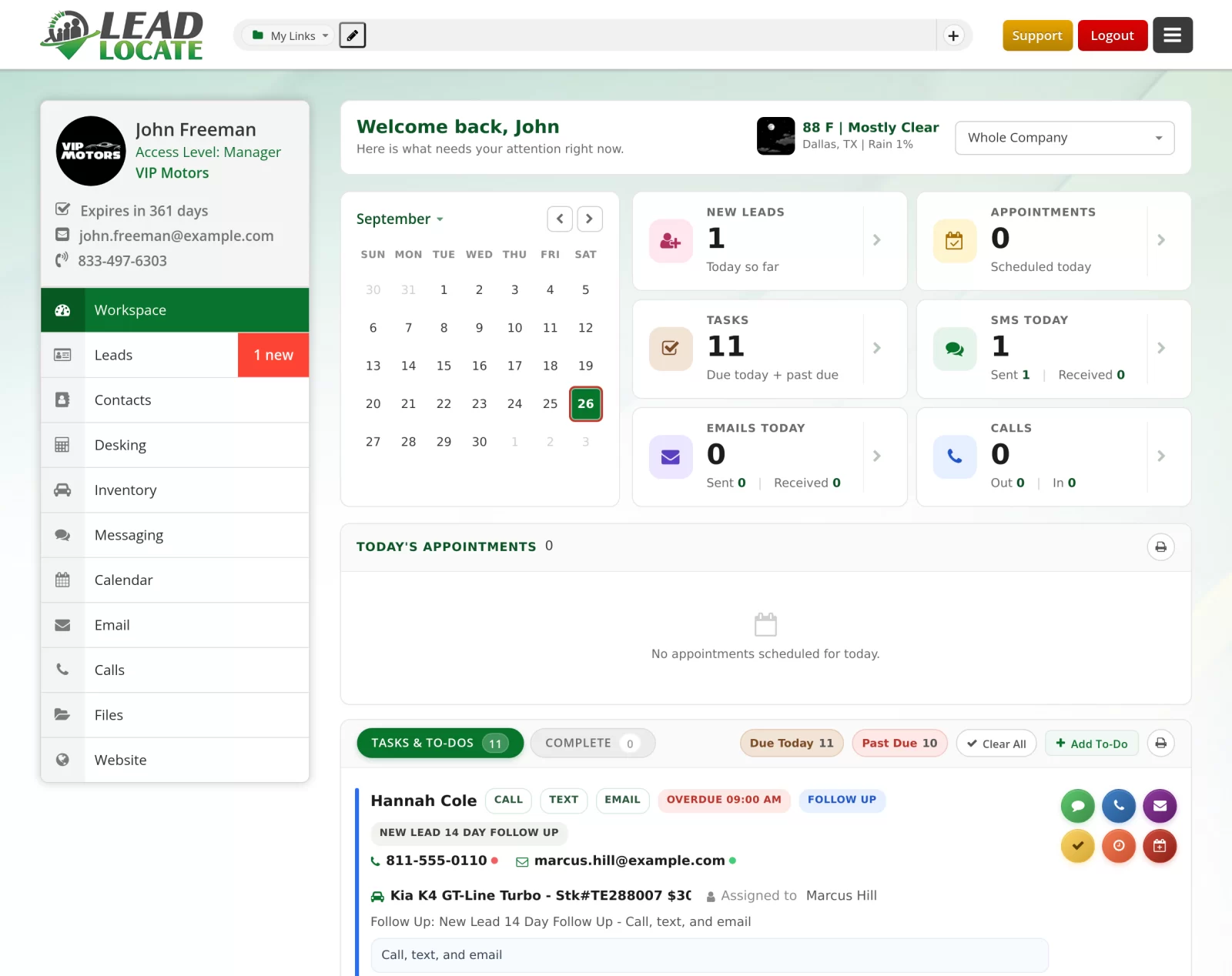
Every lead, phone call, text, email, appointment and deal lands on one record that the receptionist, the BDC agent, the salesperson, the desk manager and the sales manager all open. When a shopper calls back on Thursday about the truck she texted about on Monday, whoever answers sees the whole conversation, the vehicle, the trade and the numbers she was already shown. Before CRMs, a salesperson's whole pipeline lived on a paper calendar, sticky notes and a personal cell phone, and it walked out the door when they did.
That is why a dealer specific CRM matters. A dealership sells one particular vehicle, usually with a trade, a payment and a lender in the deal, to a buyer who reads a text faster than she returns a call. The CRM has to hold vehicles of interest and trade-in lines on the lead, text with delivery status, record and transcribe calls, turn a conversation into payment options, and block a do not call number in both directions.
LeadLocate CRM is an automotive CRM built around that work, for franchise stores, independent and used car lots, buy here pay here dealers, RV and boat dealers, auto brokers and individual salespeople. One login opens the CRM, SecureWebX for credit applications and Inventory Link for your vehicles. The desking engine sits on the main menu beside your leads, and the whole system runs on the desktop and on the LeadLocate app for iPhone and Android.
If you are comparing auto dealer software, start with the job your people do most often: working leads and following up. A car dealer CRM that keeps the shopper, the vehicle, the trade and every conversation together is where most of that day happens, so judge each system on how quickly a salesperson can pick up any lead and know exactly where it stands.
What your team sees on every lead
Swipe to see the whole screen
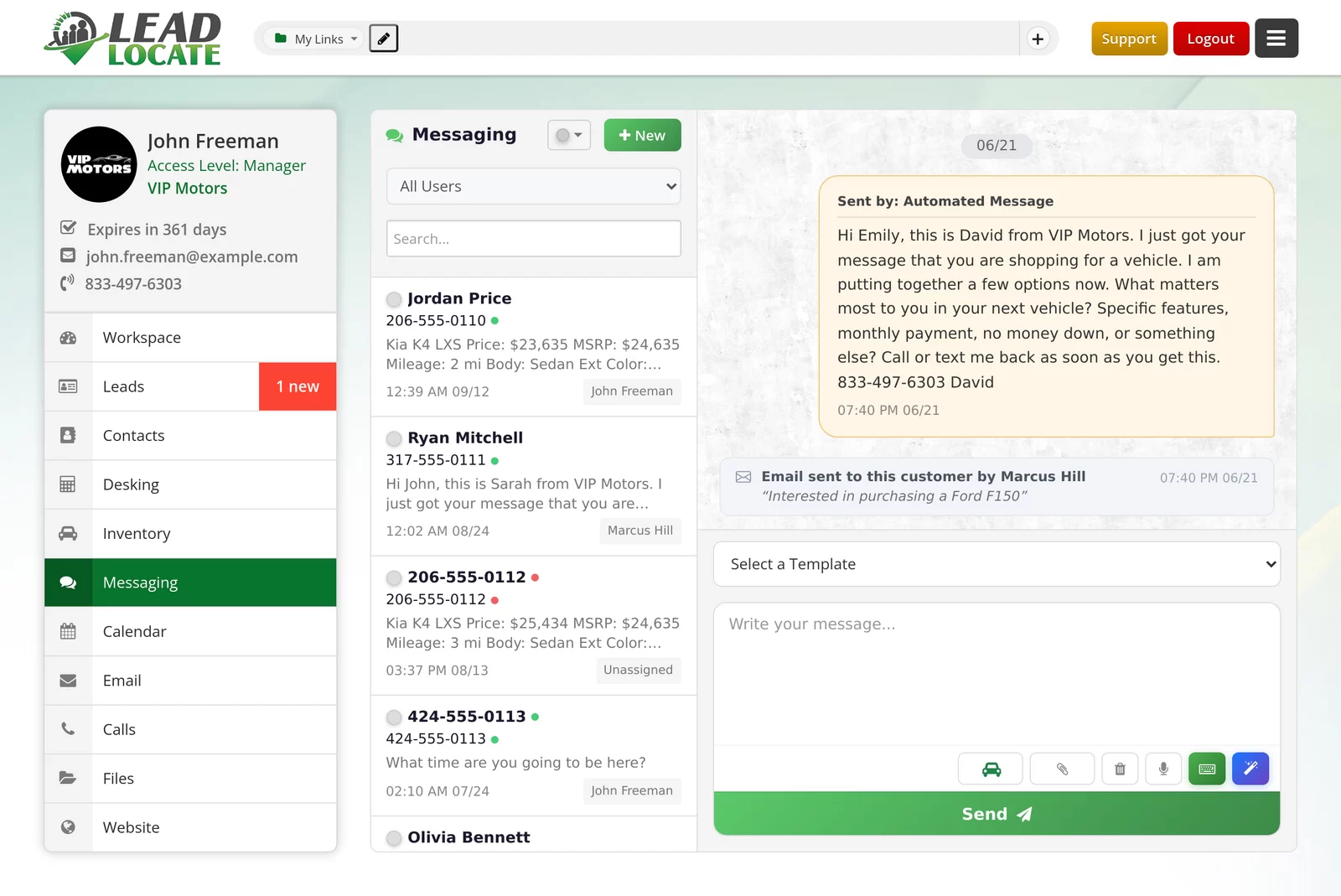
- The vehicle rides with the leadEach conversation shows the vehicle the shopper asked about, with its price, mileage and body style.
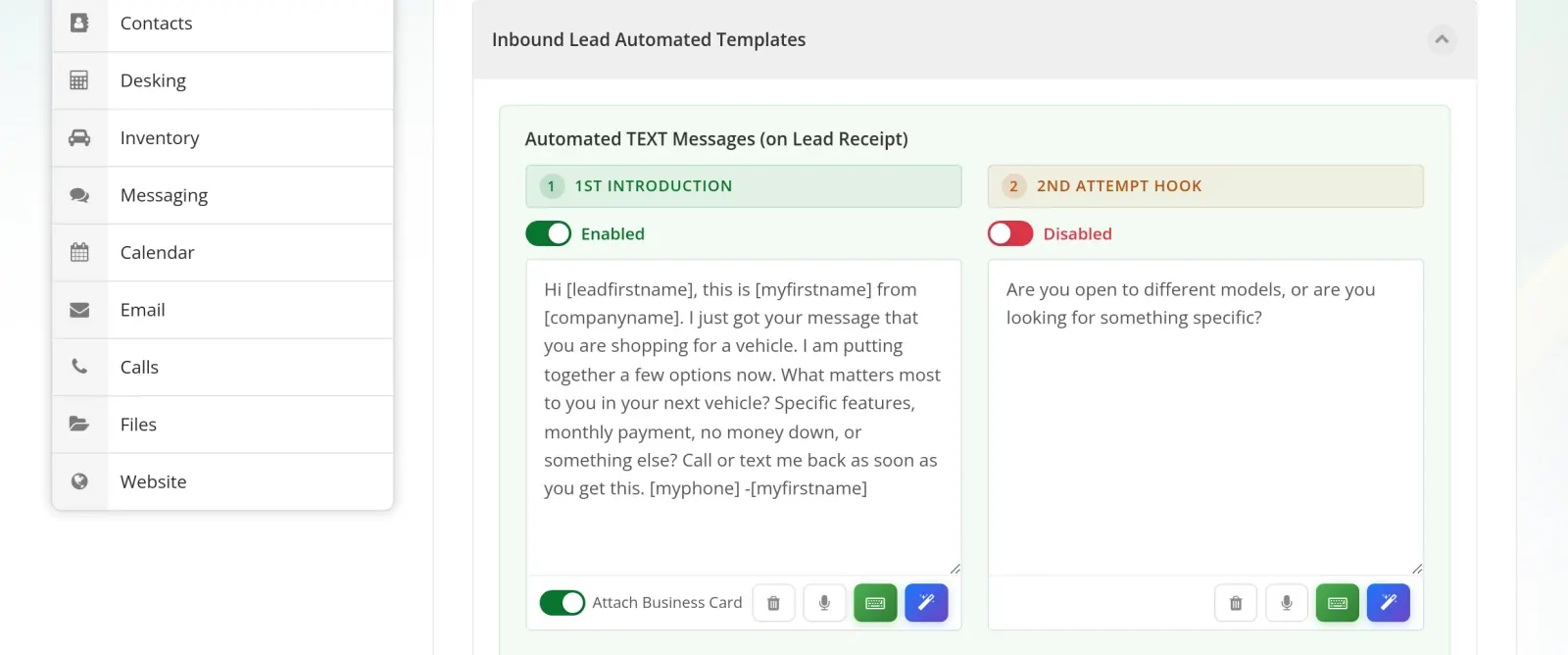
- The first text sends itselfAn Automated Template answers a new lead for its source, written as the salesperson.
- Every teammate's email lands hereAn email sent by another salesperson shows on the same thread, so nobody asks the customer twice.
- Templates in one clickPick a saved template and edit it before it goes out.
- Send a car, not a linkThe vehicle button attaches a unit from your inventory with its photos and price.
This is the Messaging screen your team works from all day. Every conversation sits on that shopper's record with the vehicle they asked about, so whoever picks up next starts where the last person stopped instead of asking the customer to start over.
The sales floor: what salespeople work from all day
Swipe to see the whole screen
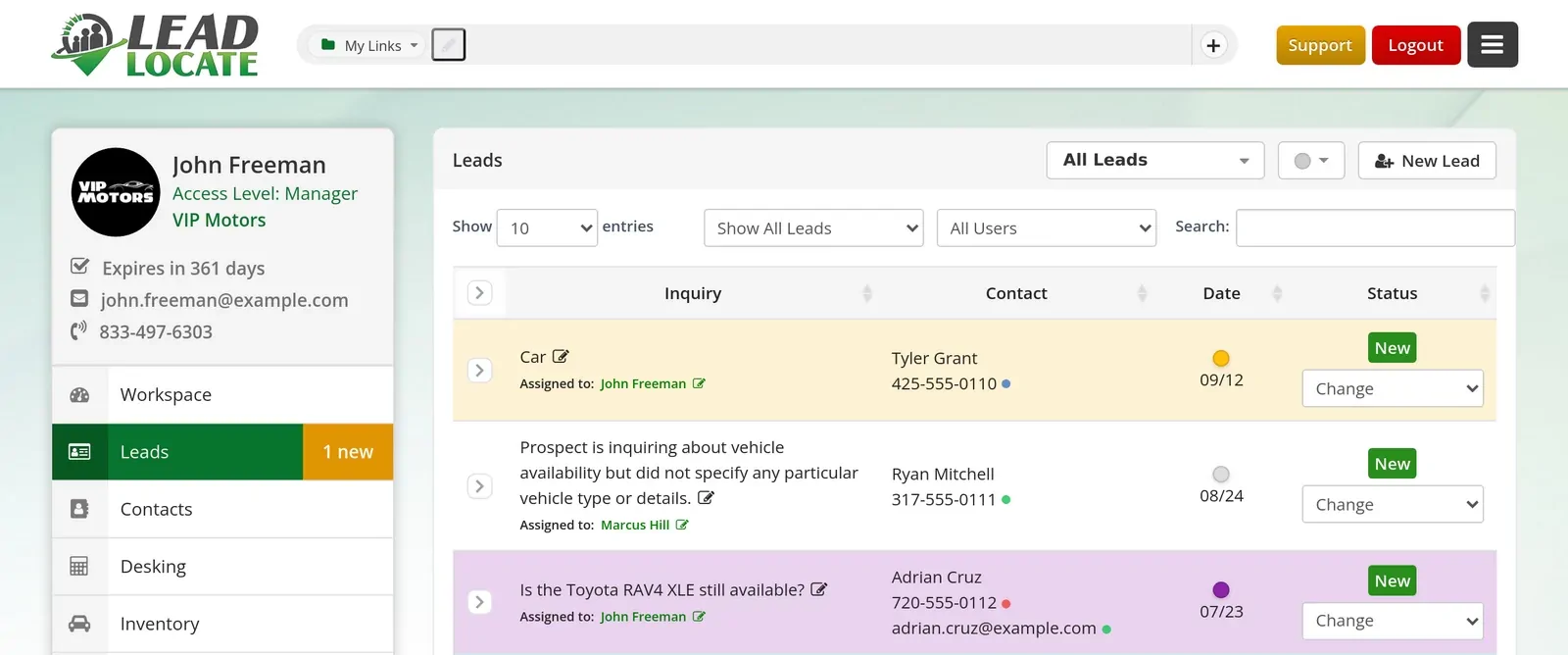
Salespeople start on the Workspace: the day's appointments, reminders and to-dos, with snooze and bulk clear for the mornings that get away from you. The lead record autosaves as they type, so a note taken during a call is saved before the call ends. Each lead holds up to five vehicles of interest plus trade-in lines, and custom statuses, tags and row colors show where every customer stands at a glance.
A lot of the selling happens by text, because buyers who let an unknown number ring will still read a short message from a salesperson they know. The Messaging inbox shows sent, delivered or failed on every bubble. The vehicle button in every composer attaches a unit from your inventory with photos and price, several vehicles go out as one text per vehicle in order, and each salesperson's own inventory link fills into every inventory template. The AI writing assistant drafts a text or email for the salesperson to edit and send.
On the lot, the LeadLocate app for iPhone and Android carries the same CRM: texting, a VoIP dialer, the calendar, inventory, Quick Schedule for booking a visit in a few taps, desking and the Deal Jacket. A driver license scan starts a customer record without typing a word.
The BDC: texting, calls and follow-up at volume
Swipe to see the whole screen
A BDC lives on the phone and the text inbox, and both are built into the CRM. Tracking numbers are set up per lead source, the browser softphone dials from any record, and every call is recorded with a transcript that opens beside the lead. Forward Calls To rings a list of your own people, business hours routing sends calls where you choose, and the virtual receptionist and an IVR call flow you build yourself answer the front door after hours.
Follow Up Processes run multi step drips by lead type. Scheduled Messages lets an agent write a text, email or voicemail drop now and send it at a chosen time, and the Scheduled Messages panel shows the BDC manager the whole team's queue. A number on the DNC Blacklist shows "Will not send", and the DNC Blacklist page runs a live do not call lookup on any number. For the database, Marketing Tools on the dock hold Bulk Texting, Bulk Email, Voicemail Drops, the Phone Validator and the Email Validator.
AI Follow-Up is ready on every LeadLocate account, and a manager switches it on in Autopilot or Practice. In Autopilot it texts and emails new leads as the assigned salesperson, answers replies, offers open appointment times and hands the conversation to a person when one is needed. In Practice it drafts every message and sends none, so you read its work first.
The desk: from conversation to numbers
Swipe to see the whole screen
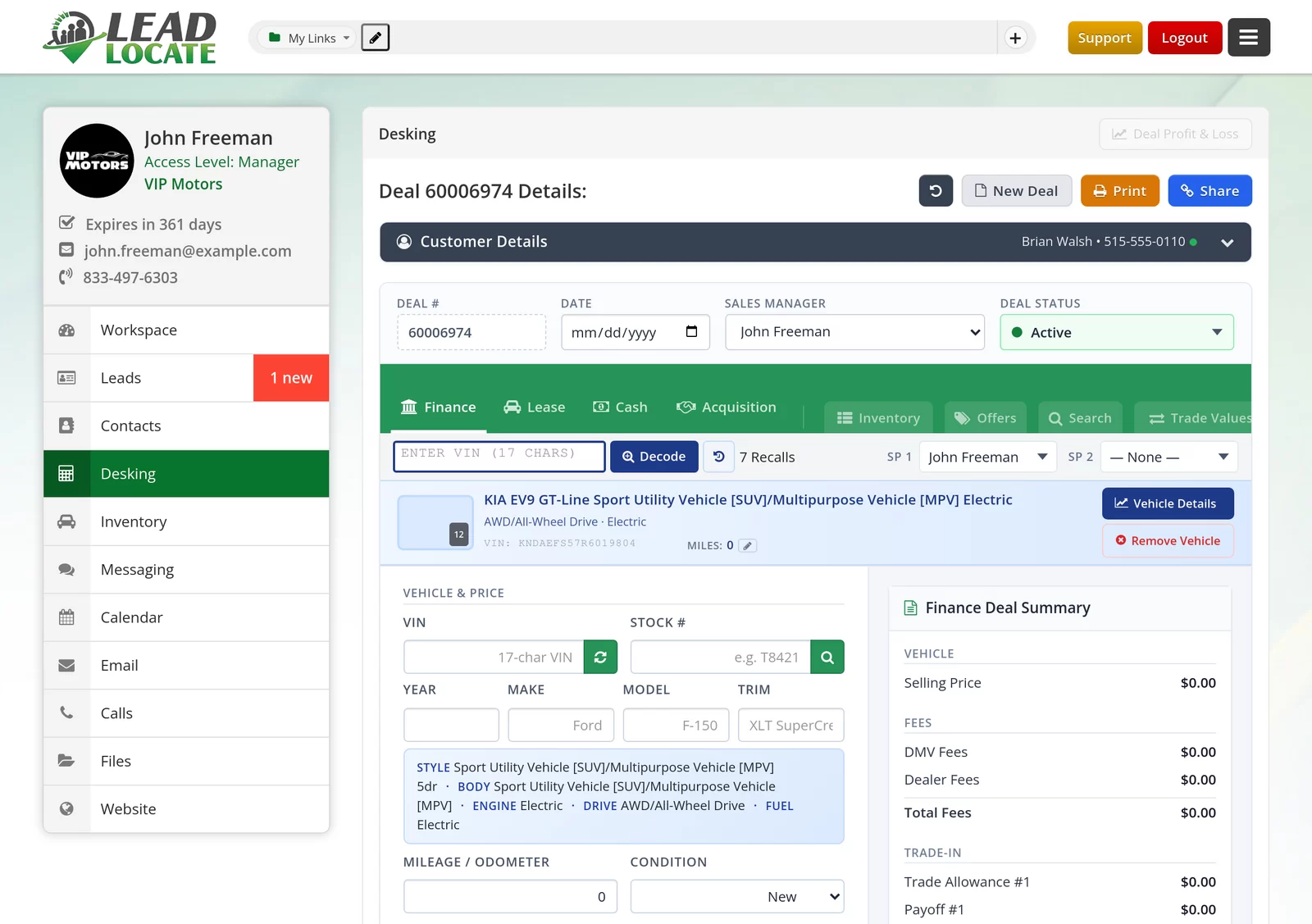
Desking is the DealTracker engine, right on the CRM's main menu. EZ Desking builds cash, finance and lease structures on a multi pencil grid with goal seek bays, a 50 state tax matrix, trade credit caps and three lease tax methods, all from deal defaults you set once. Start New Deal works straight from the lead, so nobody retypes the customer, and OEM incentives show inside the deal in the Incentives Showroom.
The trade-in form takes photos and a VIN scan. The Deal Jacket holds the paperwork, with QR intake from a phone camera, and the Road to Sale checklist shows what is left before delivery. PencilRecap turns the pencil into a shareable deal recap sheet. When the customer applies for credit, the worksheet pushes to SecureWebX, and an application the customer started and left comes back to the CRM for follow-up.
The customer gets a deal page branded to your store, with PIN access, deal chat with the salesperson and e-signature. Every customer sheet, printed or shared, carries the price and payment disclosures, and the Spanish Disclosures switch adds the same disclosures in Spanish. The desking tool page walks through the engine screen by screen.
Managers: routing, access control and reporting
An automotive CRM earns its keep in the Monday meeting, where managers set the rules and read the results. Leads route by round robin, by distribution list or by rooftop for groups with more than one store, and Manager Lead Copies put a manager on any lead feed. Custom statuses, tags and a lost reason popup keep the pipeline accurate about where each deal really stands.
Permissions work through access control. Each person's Edit User page has an Access Control card with a checkmark for every page and tool in the CRM, from Desking and Reports to Whole Team View and Sensitive Customer Data. A manager sets what each person can open, one person at a time or with Apply to Multiple Users. The job title is only a label, so a manager can hold more access than a salesperson, or less, exactly as you decide.
Reports cover activity, company and management views, and because calls, texts and emails log themselves to the record, they show what happened instead of what someone remembered to type. Call Alerts flag recorded calls that use the words you choose. A salesperson can flag a LeadLocate lead with Report an Issue for a replacement review, and when someone leaves, switching the user off hands their open leads and tasks to a successor with every note kept.

Questions? Request a Call Back
Leave your number and a lead specialist calls you back to answer your questions about pricing, coverage, and setup. Mon - Sat, 9:00 AM - 6:00 PM Pacific.
Prefer to talk right now? Call or text 844-376-2274.
Car dealership CRM, generic CRM or the DMS module
What each kind of system was built to do

Dealers shopping for auto dealer software usually weigh three paths. A car dealer CRM starts from the shopper and the vehicle; the other two start somewhere else.
| LeadLocate CRM | Generic business CRM | CRM module in a DMS | |
|---|---|---|---|
| The shopper, the vehicle and the trade | On one record: vehicles of interest and trade-in lines | Custom fields you build yourself | Shaped around the deal record |
| Two way texting | Built in, with delivery status and pictures | Usually an add-on | Depends on the DMS package |
| Calls | Browser phone, every call recorded with a transcript on the lead | Usually an add-on | Depends on the DMS package |
| Follow-up | Automated Templates, Follow Up Processes and AI Follow-Up a manager switches on | General email sequences | Depends on the DMS package |
| Desking and payments | EZ Desking for cash, finance and lease beside the lead | Not built for it | Often in the DMS itself |
| Do not call | Live do not call lookup and a DNC Blacklist | Depends on your setup | Depends on the DMS package |
| Accounting, payroll and title | Stay in your DMS, beside the CRM | Not built for it | Built in |
The generic CRM and DMS columns describe how those systems are usually sold. For the detail, read automotive CRM vs DMS and automotive CRM vs a generic CRM.
Find your kind of store
Each link opens the setup for that store type
New and used car stores
- Franchise dealershipsRuns beside the DMS you already own, with OEM incentives inside the deal and lead routing by rooftop.
- Independent dealersStart without a DMS connection or an inventory feed. Inventory Link imports your vehicles from your website.
- Used car storesTrade-in photos and a VIN scan on every deal, plus seller leads from local owners who asked for an offer.
Special finance, RV and marine
- Buy here pay hereA desking field set built for your deals, and credit applications that take an ITIN as well as an SSN.
- RV and motorhome dealersDesk RV and motorhome deals on the same engine, with the same texting, calls and follow-up as a car store.
- Boat and marine dealersMarine units in the desking field set, and every buyer conversation on one record from first text to delivery.
Brokers and salespeople
- Auto brokersDealer Profiles save deal defaults for every partner dealership, and no inventory feed is needed to start.
- Individual salespeopleYour own account, personal website and booking link, with full access on a single user account.
Your first week: what we need and what our team does
Swipe to see the whole screen
You can start on your new automotive CRM without a DMS connection or an inventory feed. Most stores are working leads in their first week.
What we need from you
- The people who will use the CRM and what each of them should open
- The lead sources you want feeding it
- How your calls should ring, and who answers after hours
- Your customer list, in whatever file your last system exports
What our team does
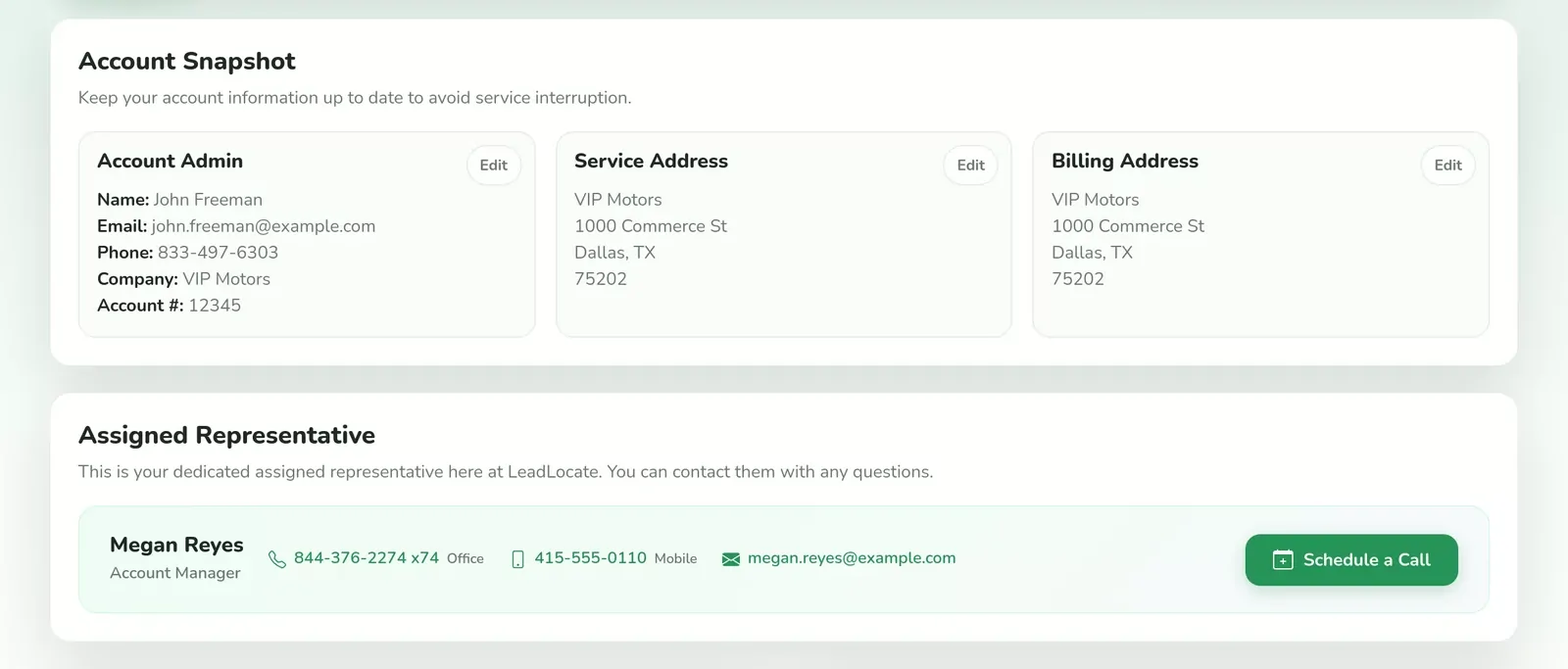
- Your account manager walks you through the account, and the welcome guide arrives at sign up.
- Smart Contact Import takes your list as an XLSX, CSV, JSON, ADF or vCard file and maps the columns for you.
- Each lead source gets its own feed in Lead Targeting, your website forms connect to the CRM, and tracking numbers are set up per source with Forward Calls To ringing the people you pick.
- Inventory Link takes your inventory feed, or imports your vehicles from your website if you have none.
- Live training is booked from Schedule Training in the top bar, and the video library and Jax, the bilingual assistant on the dock, answer how-to questions from the first login.
How pricing works for car dealership CRM software
Every LeadLocate plan is month to month with no long term contract, and every plan includes the full CRM. The bill has a few clear parts. The subscription is your plan, and plans with LeadLocate leads are sold by Marketing Effort Level: the advertising work we put behind your settings, with every lead delivered to your store only. Inbound brings buyer leads, Marketplace Acquisitions brings seller leads, and Buyers and Sellers Hybrid brings both. Each plan includes a login to start, and extra users are added per user from My LeadLocate as the team grows.
Texts, calls, emails and voicemail drops to one customer at a time come with every plan. Usage credits, bought in prepaid packs in My LeadLocate, cover bulk texting, bulk email, ringless voicemail deliveries and phone or email validation. Every plan is listed on the pricing page.
Compare plans for your store
Month to month on every plan
REAL-TIME
INBOUND LEADS
Month-to-Month Service
✅ Inbound Plans include integration with our advertising feeds that generate leads for you.
Generate fresh sales leads, get a personal website, capture leads through a referral link, automate marketing, and more.
MARKETPLACE
ACQUISITIONS
Month-to-Month Service
✅ Acquisitions Plans include ad campaigns that bring offer requests from local car sellers.
Includes everything you need to buy vehicles direct from local owners who asked for an offer, then retail or wholesale them.
BUYERS & SELLERS
HYBRID PLAN
Month-to-Month Service
✅ Hybrid Plans include 1x Buyer Effort + 1x Seller Effort every month.
Buy cars from local owners who asked for an offer and sell to in-market buyers, with both lead types in one CRM pipeline.
Frequently Asked Questions
What is the difference between an automotive CRM and a DMS?
An automotive CRM works the customer before and during the sale: leads, texts, calls, appointments, follow-up and desking. A DMS runs the business after the deal: accounting, payroll, parts, service and title work. LeadLocate is the CRM, and it works alongside whichever DMS your store runs.
Do we need a DMS connection or an inventory feed to start?
No. Leads, texting, calls and desking work in the CRM from the first login. Inventory Link takes your inventory feed if you have one, or imports your vehicles from your website when there is no feed.
Can the BDC and the sales floor work the same leads?
Yes. Everyone opens the same customer record, so a BDC agent's texts and calls sit on the timeline the salesperson reads. A manager decides who sees the whole team's records with the Whole Team View checkmark on each person's Access Control card.
Does the CRM include texting and a phone system?
Yes. Two way texting with pictures and delivery status, a browser softphone with recording and transcripts, tracking numbers per lead source, call forwarding, a virtual receptionist and voicemail drops are built in, and every touch logs itself to the lead.
Can we bring our customers over from our old CRM?
Yes. Export your list and Smart Contact Import takes it as an XLSX, CSV, JSON, ADF or vCard file and maps the columns for you. Duplicate leads can be merged into one record afterward.
How many users can we add?
Each plan includes a login to start, and extra users are added per user from My LeadLocate. Managers add people themselves while the account has an open license, and each person gets the desktop CRM and the phone app.
What happens to a salesperson's leads when they leave?
A manager switches the user off and hands their open leads and tasks to a successor, or marks them on temporary leave. Every note, call and text stays on the record with its original author.
Is there a long term contract?
No. Every plan is month to month. Automatic Renewal is a switch in My LeadLocate, and a cancellation needs 10 days notice before the next billing date.
See your store run on one automotive CRM
Leave your number and a LeadLocate specialist calls you back, or compare plans on the pricing page and start today. Every plan is month to month.
Prefer to talk right now? Call or text 844-376-2274.


LeadLocate™ All rights reserved. Other product and company names mentioned herein are the property of their respective owners.
Answers to your questions:
LeadLocate is an all-in-one lead generation software and CRM platform. We generate in-market sales leads and provide you with all the tools necessary to sell that customer. All of your leads, texts, calls, emails, deals, and files are available in one place, accessible with a single login.

LeadLocate™ All rights reserved. Other product and company names mentioned herein are the property of their respective owners.
Answers to your questions:
LeadLocate is an all-in-one lead generation software and CRM platform. We generate in-market sales leads and provide you with all the tools necessary to sell that customer. All of your leads, texts, calls, emails, deals, and files are available in one place, accessible with a single login.