


Mon - Sat: 9:00 AM - 6:00 PM
Desking Tool for Dealers, Built Into Your CRM
Every deal type, every state, one record
- Finance, lease, cash and acquisition on one deal
- Tax setup for all 50 states and DC
- Customer sheets your buyer can mark up and sign online

Finance desk
Vehicle, price, trade, add-on products, rebates, taxes and fees on the left, with the deal summary moving on the right as you type. Pay monthly, semi-monthly, bi-weekly or weekly, with simple or add-on interest, balloon notes and a payment frequency to match every lender.
See the worksheets- Taxable and capitalized switches on every fee and product
- Trade credit method, cap and negative equity tax per deal
- Quick picks for your usual downs and terms

Lease desk
Money factor, residual percent and dollars, acquisition fee capitalized once, mileage and excess mile rate, security deposits and multiple security deposits with the rate cut per deposit. Every lease shows its one pay price and the saving over monthly payments, and due at signing is itemized on screen and on the sheet.
Lease and broker desks- Lease programs from advertised offers and your own recent leases
- Monthly, up front on payments or up front on price lease tax
- Closed-end, open-end, one pay and single pay lease types

Cash deals
A clean cash worksheet with the balance due at signing and the total purchase price up top, the trade equity and tax credit worked out, and every fee and product line accounted for. The same disclosures print on the cash sheet, without payment lines.
See the worksheets- Balance due at signing in one figure
- Trade equity and tax savings shown
- Same customer sheets as finance

Buying from the customer
Buy a car from a customer on the same deal page. Enter your offer, reconditioning and the payoff with its lienholder, and the desk shows what the customer walks away with, your total investment, the gross profit potential at your retail price and the return on investment. The sheet becomes an offer letter.
Used car stores- Net to customer and total dealer investment
- Retail analysis with gross and return
- Inventory readiness checklist
Swipe to see the whole screen
Multi-Pencil Grid
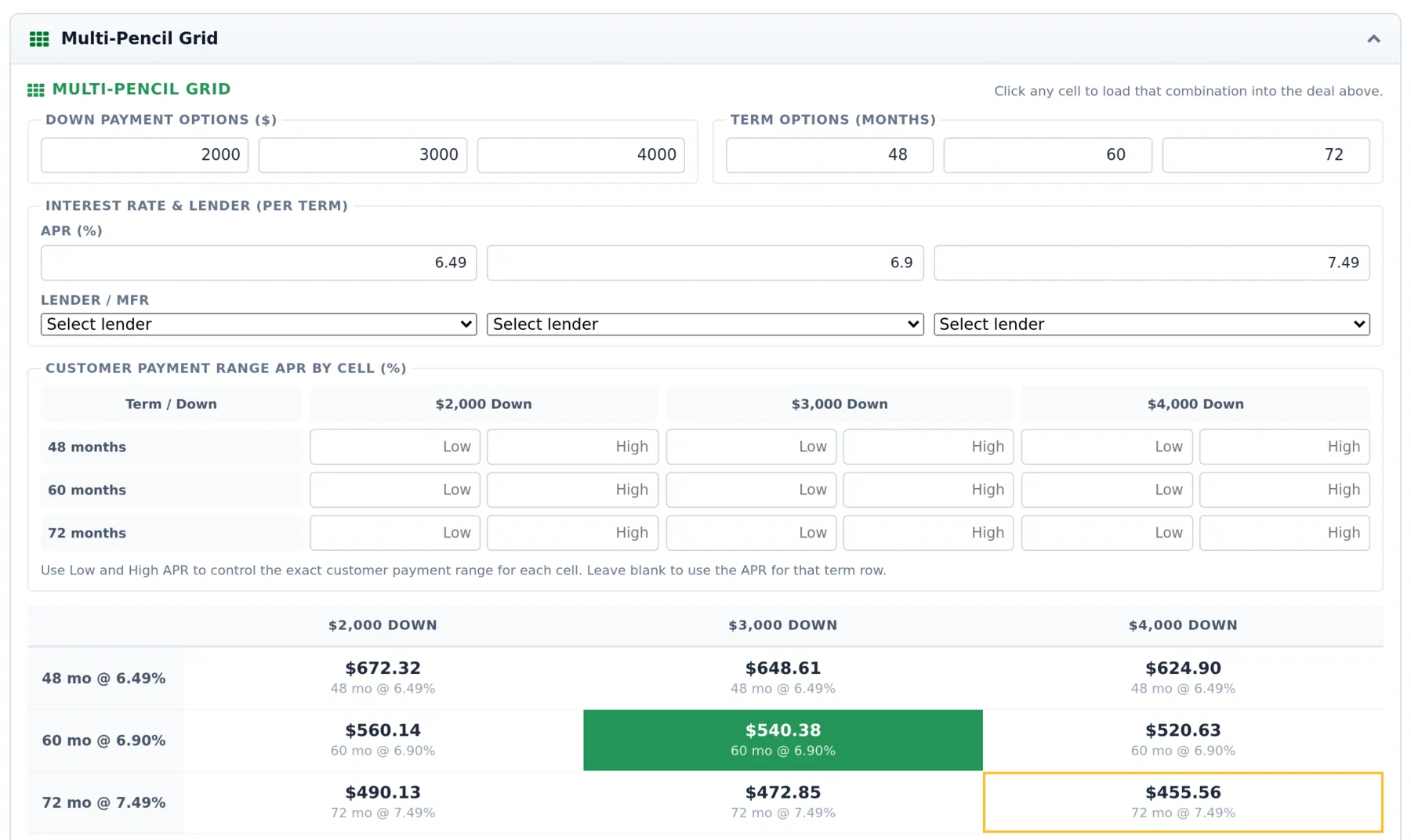
Three down payments across three terms, each term with its own rate and lender. Click any of the nine payments to load it into the deal. Give a cell a low and a high rate and the customer sheet shows a payment range instead of a single number.
How to desk a deal- Selected combination and lowest payment marked
- A rate and lender per term
- Ranges carry through to Customer Views v3 and v4
Swipe to see the whole screen
Goal-Seek Desking
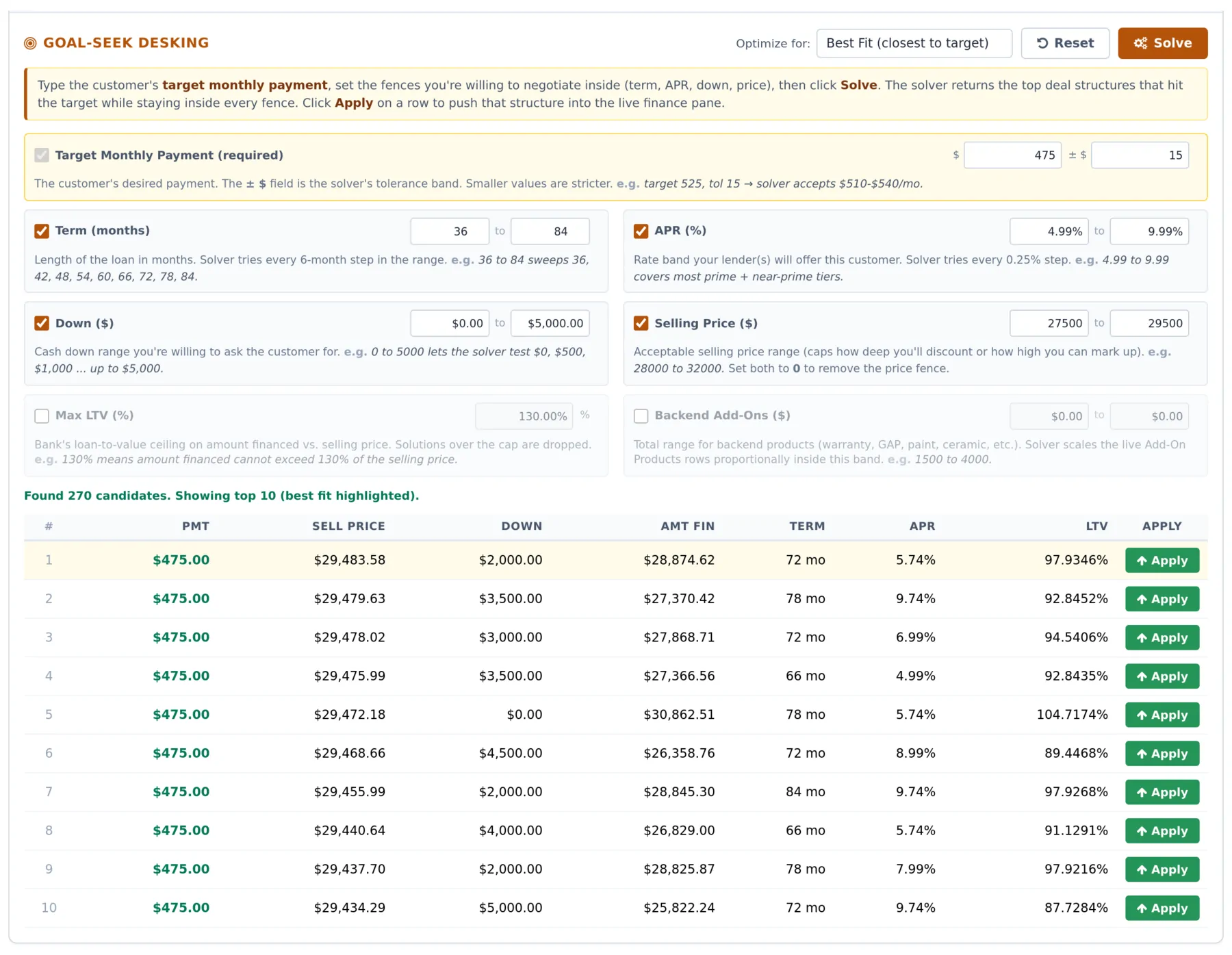
Type the payment the customer asked for and the fences you will work inside: term, rate, down, selling price, loan to value and backend products. The solver returns the ten closest structures, best fit on top, and Apply loads the one you choose into the deal.
See a deal desked- Optimize for best fit, top price, lowest rate, shortest term or down
- Every answer stays inside your fences
- Works on leases too, residual and money factor included
Swipe to see the whole screen
Trade-in
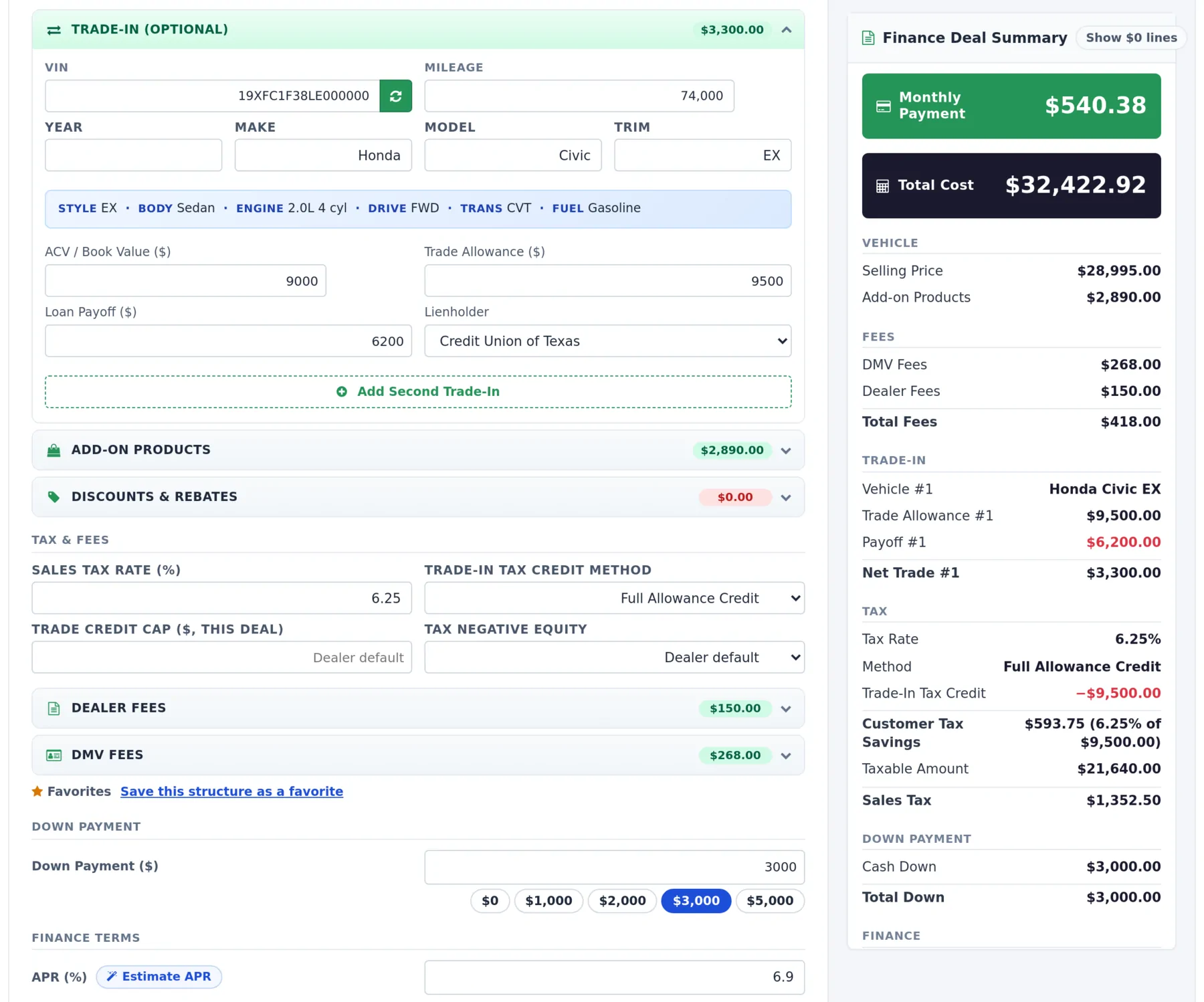
Two trades per deal, each with VIN decode, mileage, actual cash value, allowance, payoff and lienholder from a list of more than 200 lenders. Negative equity rolls into the amount financed or the lease cap cost, and a full book value report on the trade sits one click away on the deal.
Trade-in capture- A second trade with one click
- Payoff and lienholder on every trade
- Book value reports kept with the deal
Swipe to see the whole screen
Deal Profit and Loss
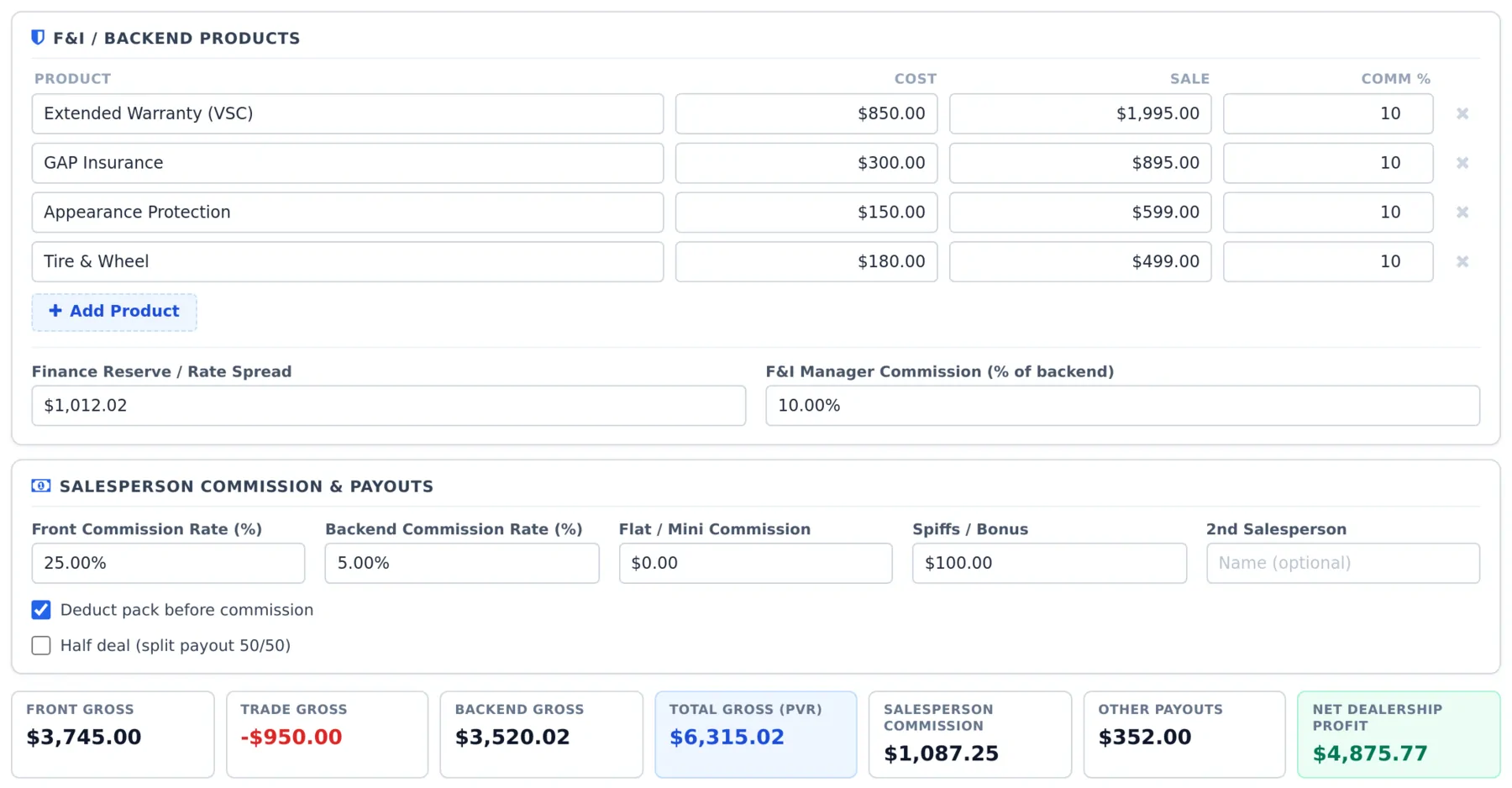
Front gross from price, cost, pack, holdback, incentives and doc fee profit; trade gross from actual cash value against allowance and reconditioning; backend products with cost, sale and commission; finance reserve; and every payout down to the second salesperson. Compare a conservative, likely and best case, then print it.
For F&I managers- Total gross per vehicle and net dealership profit
- Front, back, flat, spiff and half deal commissions
- Auto filled from the desk with Sync from deal
Start every deal from the lead
Most stores desk a deal in one program, keep the customer in another and chase signatures in a third. LeadLocate puts the desking tool on the deal page inside the CRM, so the salesperson, the desk manager, the F&I office and the buyer all work from the same record and the same numbers. There is no second login, no export and no retyping. That is what dealership desking looks like when the desk and the CRM are one product.
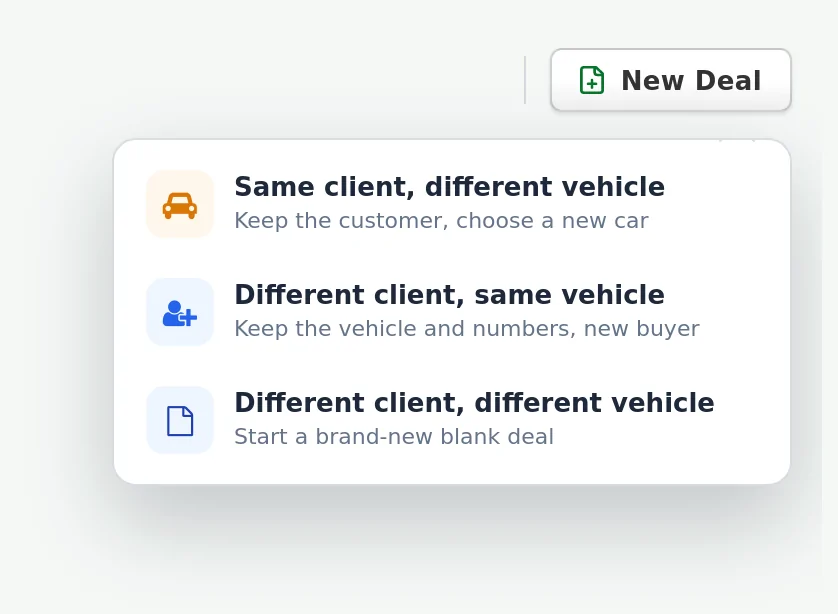
Start a deal from the lead and the vehicle, VIN, miles, stock number and up to two trades come across from the lead itself. The New Deal menu covers the moments every floor knows: the same client on a different vehicle, a different client on the same vehicle and numbers, or a blank deal for a new buyer on a new car. Pull the unit from your inventory feed with the Inventory tab, or search listings near your store from the Search tab and swap the deal vehicle with one click.
On every deal
- Deal statuses from Active and Hot Opportunity through Negotiating, In Financing, Sale Pending and Sold
- First and second salesperson, sales manager and co-buyer on every deal
- Deal chat with the customer on the same page as the numbers
- Every deal reachable from the lead, the deal list and the phone app
The life of one deal
Lead becomes a deal
Deal status: ActiveStart a deal from the lead and the vehicle, VIN, miles, stock and trades come with it.
Start from the leadDesk it
Deal status: Deal WorkingPencil the grid, solve for the payment or load a lease program.
See the Pencil GridValue the trade
Deal status: NegotiatingDecode the VIN, pull a book value report and set the payoff.
See the tradeWork the F&I side
Deal status: In FinancingBuy rate, reserve, ratios against your guidelines and the payment schedule.
See the F&I DeskSend it to SecureWebX
Deal status: In FinancingPush to SWX sends the lender worksheet, and every update keeps that worksheet current.
See the lender pushShare the numbers
Deal status: Deal SentText or email a customer sheet or the private deal page.
See the sheetsThe buyer signs
Deal status: Sale PendingThey mark it up, Click to Sign, and your salesperson gets a text.
See the buyer's sideFiled to the deal
Deal status: SoldThe signed copy lands in the Deal Jacket and every step is on the Deal Record.
See the Deal Record
The F&I office and the lender on the same numbers
The F&I Desk sits inside the finance tab. Enter the buy rate, credit tier, approval status, co-signer and stipulations, choose simple or add-on interest with the true APR shown, set the interest to the first payment and the first payment date, and add a balloon when the note calls for one. Buy here pay here stores get an in-house credit tier, weekly, bi-weekly or semi-monthly payments and up to three deferred down payments, each with its own due date.
Type the buyer's gross monthly income, other debt and housing payment and the desk shows payment to income, debt to income and loan to value against your own guidelines, along with the rate spread and your estimated dealer reserve. Open the Payment Schedule for a full printable amortization table, and send the reserve to the Deal Profit and Loss with one click.
Estimate APR gives your team a starting rate from a few credit answers: a score or no score yet, other auto loans, auto credit history, bankruptcy, repossession and income. It returns the rate at every term, the buy rate, approval odds and any manufacturer special, fills the deal when you click Use and puts everything back when you click Undo. The buyer's credit answers are never saved.
SecureWebX. Push to SWX sends the deal to SecureWebX as a lender worksheet. Every later push updates that same worksheet, the attached credit application copy follows the newest numbers, and the lender figures (truth in lending, loan to value, payment to income and debt to income) are worked out from your CRM desk. Customer details, your profit and loss, notes and stipulations stay in the CRM, and the SecureWebX History Log shows who pushed, when, and the worksheet ID.
Tax rules for every state
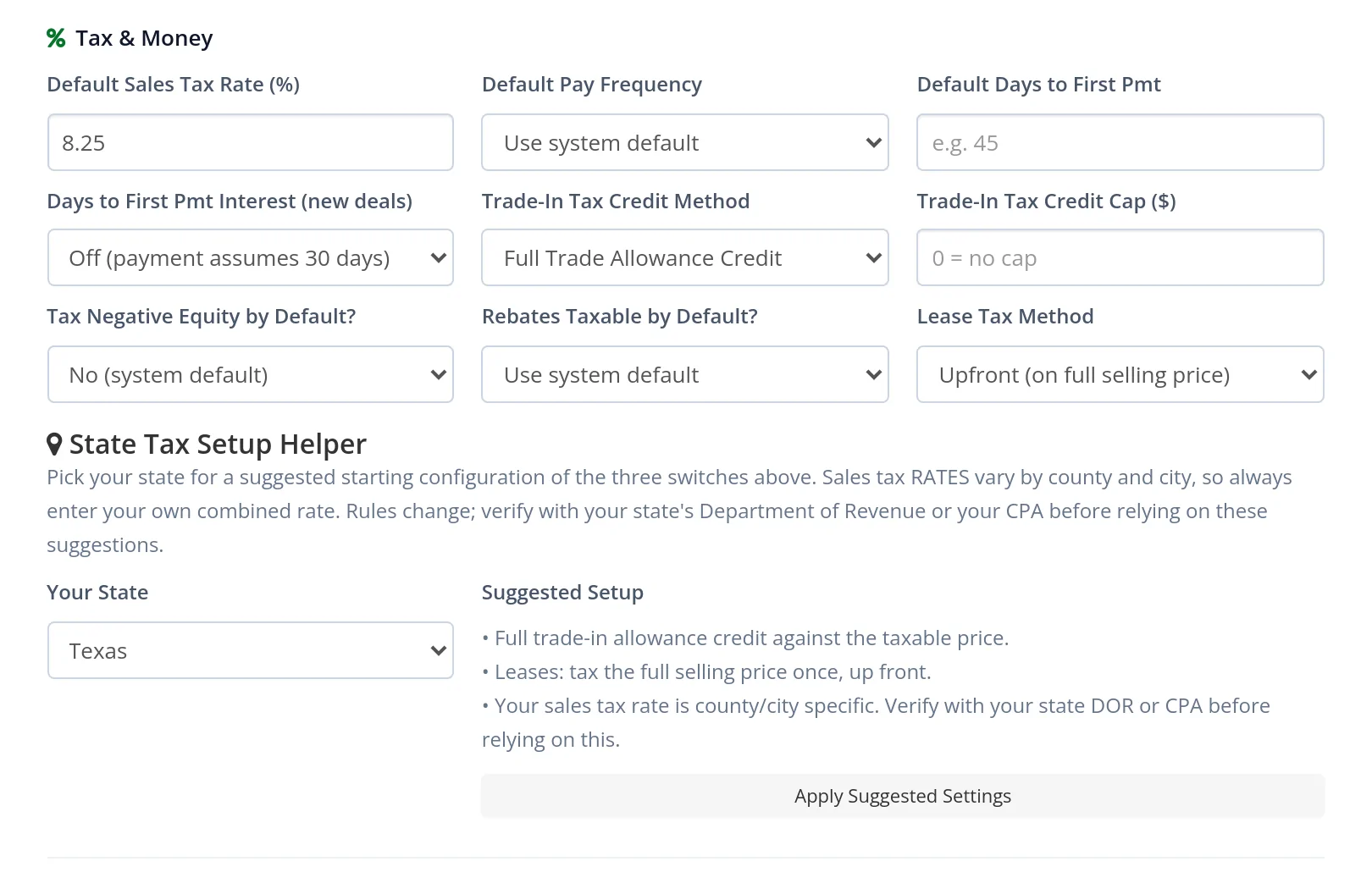
Pick a state to see the setup the desk applies there. The State Tax Setup Helper fills the trade-in credit method, any credit cap and the lease tax method for your state, and each deal can change them for a buyer who registers somewhere else.
Texas
Tax or fee up front on the selling price
- Full trade-in allowance credit against the taxable price.
- Leases: tax or fee on the full selling price, once, up front.
The customer's ZIP fills a typical combined rate for the deal, and your store sets its exact rate once in Deal Defaults.
- Full trade-in credit, lease tax on each payment35
- Lease tax up front on the total of payments5
- Tax or fee up front on the selling price2
- No trade-in tax credit4
- Trade-in credit up to a state cap1
- No state vehicle sales tax4
Every switch can be changed on a single deal: a trade credit cap and negative equity tax for a buyer registering in another state, and California's rules follow a California buyer even when the store sells from another state.
See every state in one table, with the state notes
| Rule group | Trade-in credit | Lease tax | States |
|---|---|---|---|
| Full trade-in credit, lease tax on each payment | Full trade-in allowance | Added to each monthly payment | Alabama, Arizona, Arkansas, Colorado, Connecticut, Florida, Idaho, Indiana, Iowa, Kansas, Kentucky, Louisiana, Maine, Maryland, Massachusetts, Mississippi, Missouri, Nebraska, Nevada, New Jersey, New Mexico, North Carolina, North Dakota, Oklahoma, Pennsylvania, Rhode Island, South Carolina, South Dakota, Tennessee, Utah, Vermont, Washington, West Virginia, Wisconsin, Wyoming |
| Lease tax up front on the total of payments | Full trade-in allowance | At signing, on the total of payments | Georgia, Illinois, Minnesota, New York, Ohio |
| Tax or fee up front on the selling price | Full trade-in allowance | At signing, on the full selling price | Delaware, Texas |
| No trade-in tax credit | None: tax on the full price | Added to each monthly payment | California, District of Columbia, Hawaii, Virginia |
| Trade-in credit up to a state cap | Full allowance up to the state cap | Added to each monthly payment | Michigan |
| No state vehicle sales tax | No state vehicle sales tax | Local tax only, where it applies | Alaska, Montana, New Hampshire, Oregon |
State notes the helper adds
- California: the CARS Act disclosures print on every sheet for California stores and California buyers.
- Delaware: no sales tax, but a 5.25% document fee on the price is charged when the vehicle is titled, so the helper sets it up as the rate, with trade-in credit for trades titled in Delaware.
- Michigan: the cap rises every January until it ends, and trades on recreational vehicles have no cap.
- North Carolina: a highway use tax in place of sales tax, and the setup notes give the rate to enter.
- South Carolina: a capped infrastructure maintenance fee in place of sales tax, explained in the setup notes.
- Illinois: lease tax collected at signing on the payments plus any down payment, which most stores capitalize.
- Alaska: some boroughs and cities charge a local vehicle tax, set as your local rate.
Set up once for your store
Every dealership desks a little differently, so the desking tool is built around your own defaults. Desking Settings holds your dealership profile and your Deal Defaults, and every new deal on every tab starts from them.
Swipe to see the whole screen
Set once, used on every deal
- Your state's tax switches filled in one click
- Up to three preferred lenders on every new deal
- Payment, ratio, term, markup and doc fee ceilings
- Fees and products per deal tab, ready to price
- A separate setup for each partner dealership
Tax and money. Set your default sales tax rate, payment frequency, interest to the first payment, trade-in tax credit method and cap, negative equity tax, rebate taxability and lease tax method. The State Tax Setup Helper fills the three tax switches for your state in one click, and you confirm your exact combined rate once.
Lenders and guidelines. Pick up to three preferred lenders so they prefill the deal and the pencil grid. Set your program ceilings: maximum payment to income, debt to income, loan to value and term, your dealer reserve share, the most rate markup you allow and your doc fee cap. Deals that run past them are flagged on the desk before they reach a bank.
Your brand and your rules. Your logo, colors, header image, credit application link and footer appear on the customer side. Dealer Profiles keep a separate desking setup for each partner dealership you desk for. Access control decides who can desk, who can change defaults and who can withdraw a shared sheet.
Fees, products and structures. Each tab keeps its own default DMV fees, dealer fees and add-on products, with taxable and capitalized switches. Defaults never preload a priced add-on product, so every product on a deal is one your team chose to offer. Loan defaults, pencil grid defaults (three downs by three terms, with a rate and lender per row), lease program defaults and Quick Desk choices for terms, mileage and down payments put your usual structures one tap away. Save any structure as a favorite from the deal itself.
Ready on day one. A new store arrives with its state's base sales tax rate and the three tax switches already filled in, and the system defaults give every tab fee and product rows to rename and price. If a setting ever drifts, Reset Defaults to System puts the starting point back, and Jax, the guide built into the CRM, explains each desk tool in plain words whenever someone asks.

Questions? Request a call back
Leave your number and a lead specialist calls you back to answer your questions about pricing, coverage, and setup. Mon - Sat, 9:00 AM - 6:00 PM Pacific.
Prefer to talk right now? Call or text 844-376-2274.
Checks that catch a mistake before the customer sees it
A desk is only as good as its last number, so the desking tool checks the deal while it is being worked. Deals that run past your own lender guidelines for payment to income, debt to income, loan to value or term are flagged on the desk, and the F&I Desk shows the rate spread against your maximum markup and the doc fee against your cap before anything prints.
Double-check my work runs a review of the whole deal before it goes to the customer: checks on the math and the structure, plus an AI review that reads the deal the way a second manager would. The second page of the Dealer View is a compliance checklist that marks each item OK, CHECK or TO DO, from optional products and the doc fee cap to the paperwork a sale still needs.
The page protects the work itself, too. If someone changes the same deal in another tab or from another desk, the page says so before anything is saved, so two managers never overwrite each other. A price your desk typed is never replaced when an inventory feed or a VIN decode loads a new number.
Five customer sheets and a dealer view
Print or text any of them from the desking tool.
Three clear choices
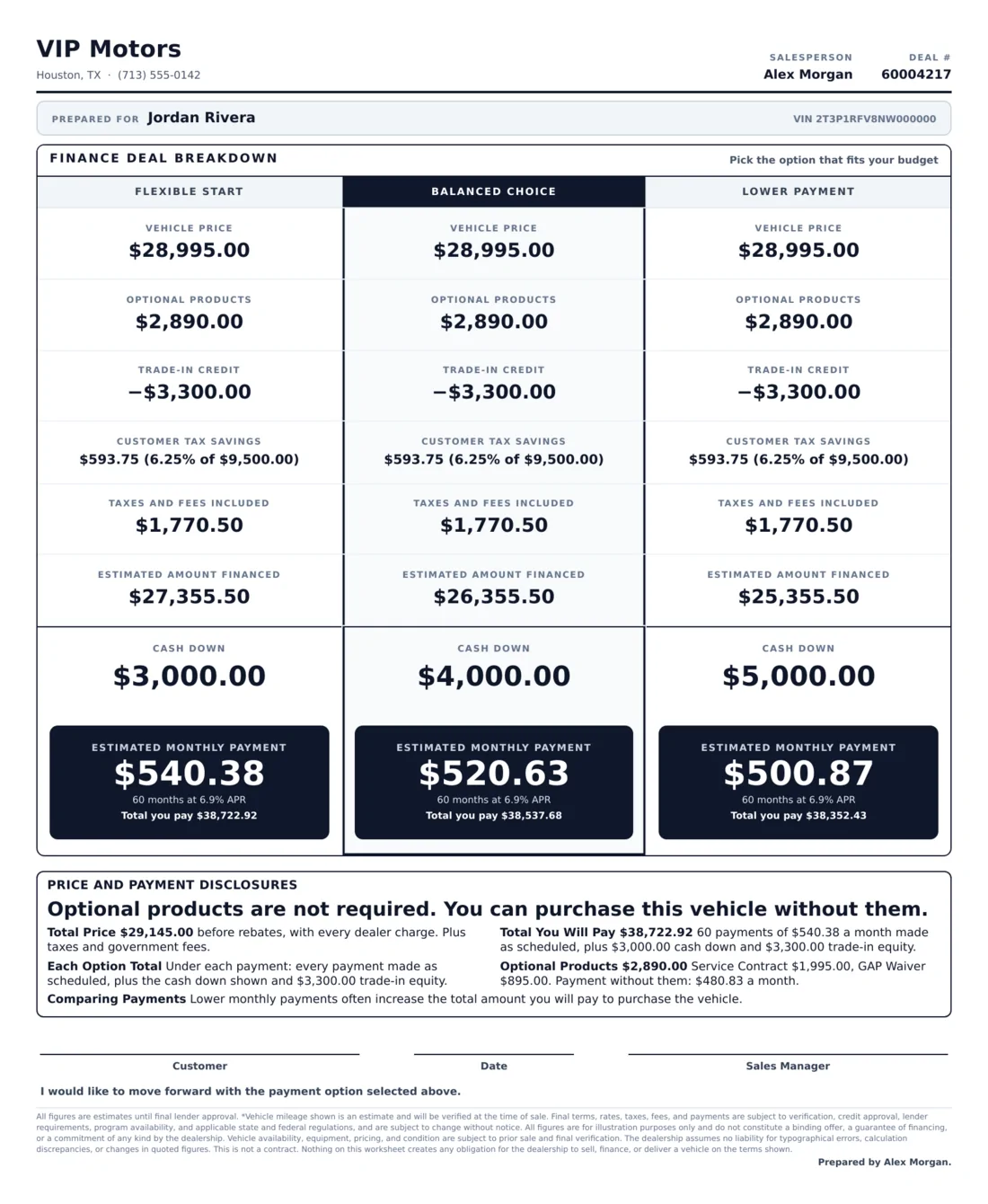
Flexible start, balanced choice and lower payment side by side, each with its vehicle price, products, trade credit, tax savings, amount financed, cash down and payment, with the total paid under every payment.
Every line, explained
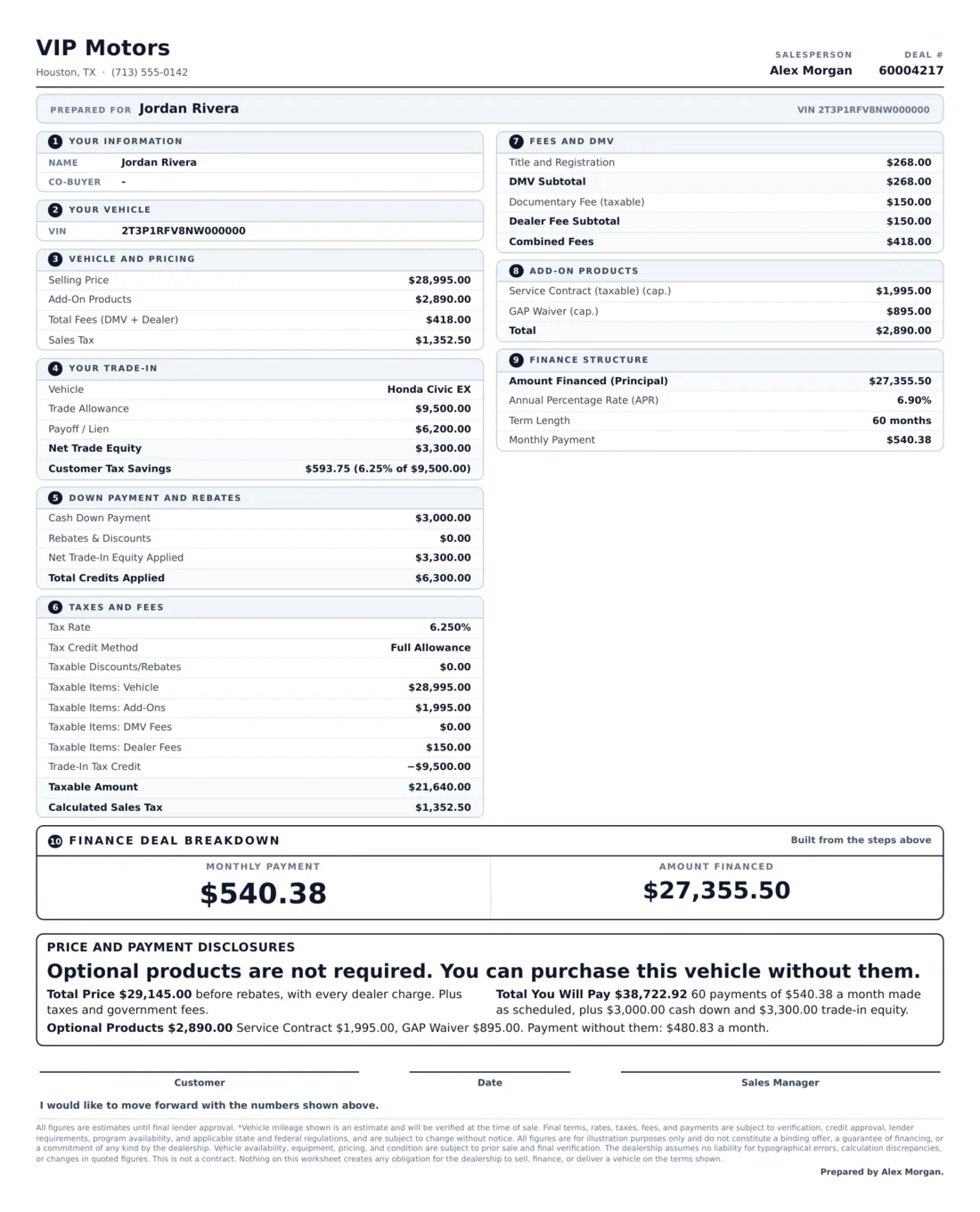
The full deal in numbered steps: your information, your vehicle, price, trade, down payment and rebates, taxes and fees, add-on products and the finance structure, ending with the monthly payment and amount financed.
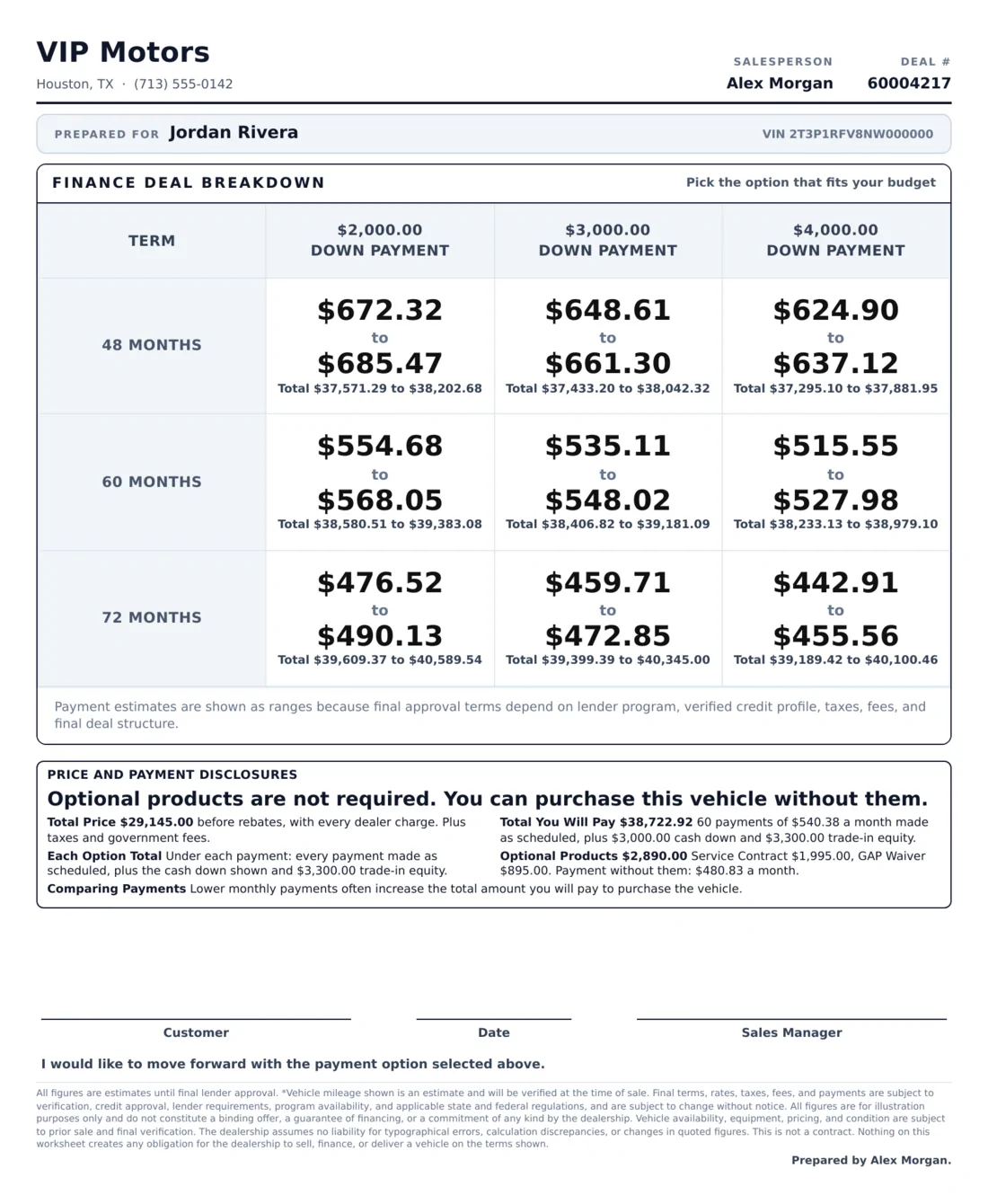
A range in place of a promise
Each cell shows a low to high payment from the rate range you set, with the total for each, so the buyer sees where the payment will land before the lender answers.
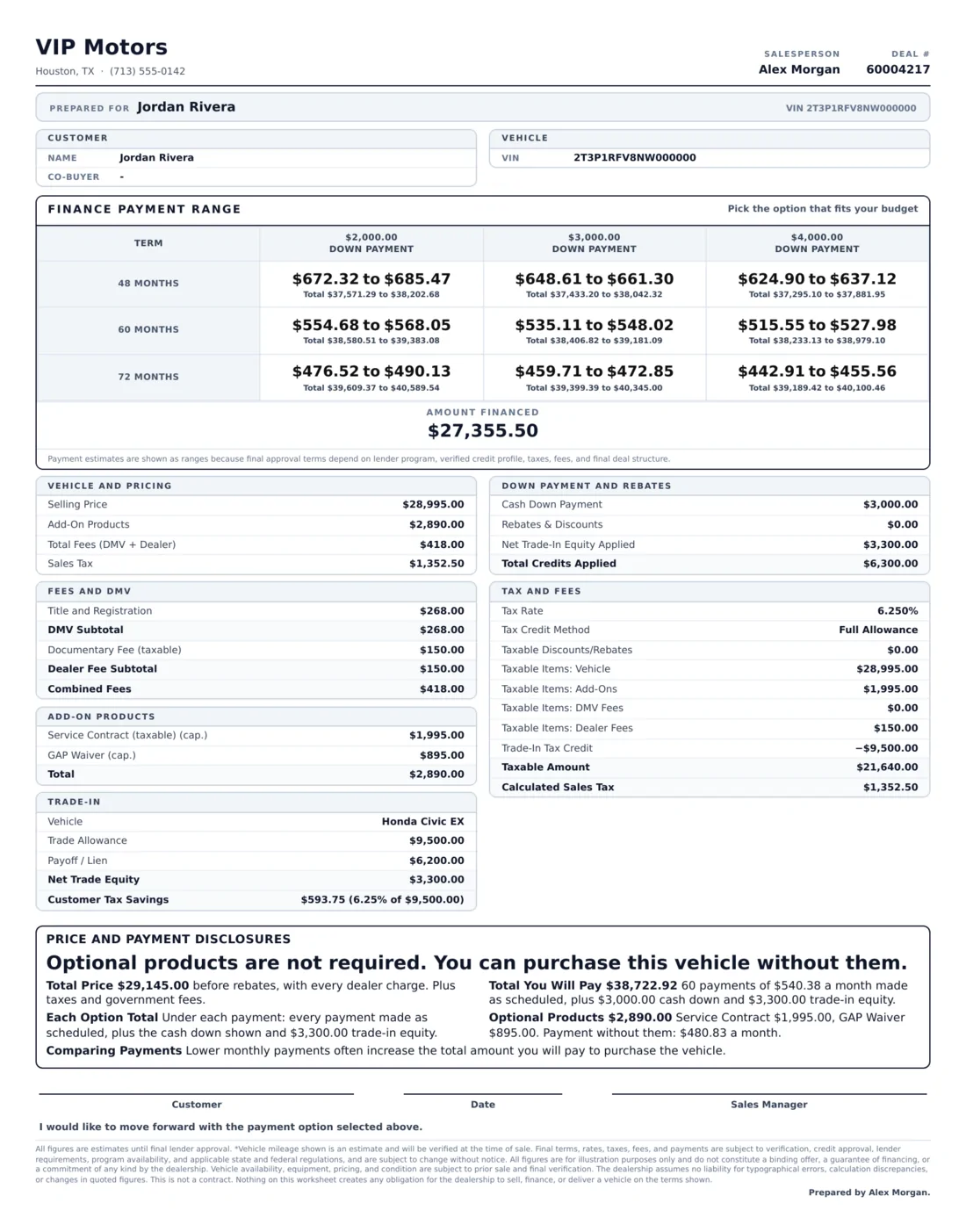
Ranges with the full detail
The payment range grid on top of the complete pricing, fees, trade and product detail, for buyers who want to see every figure behind the range.
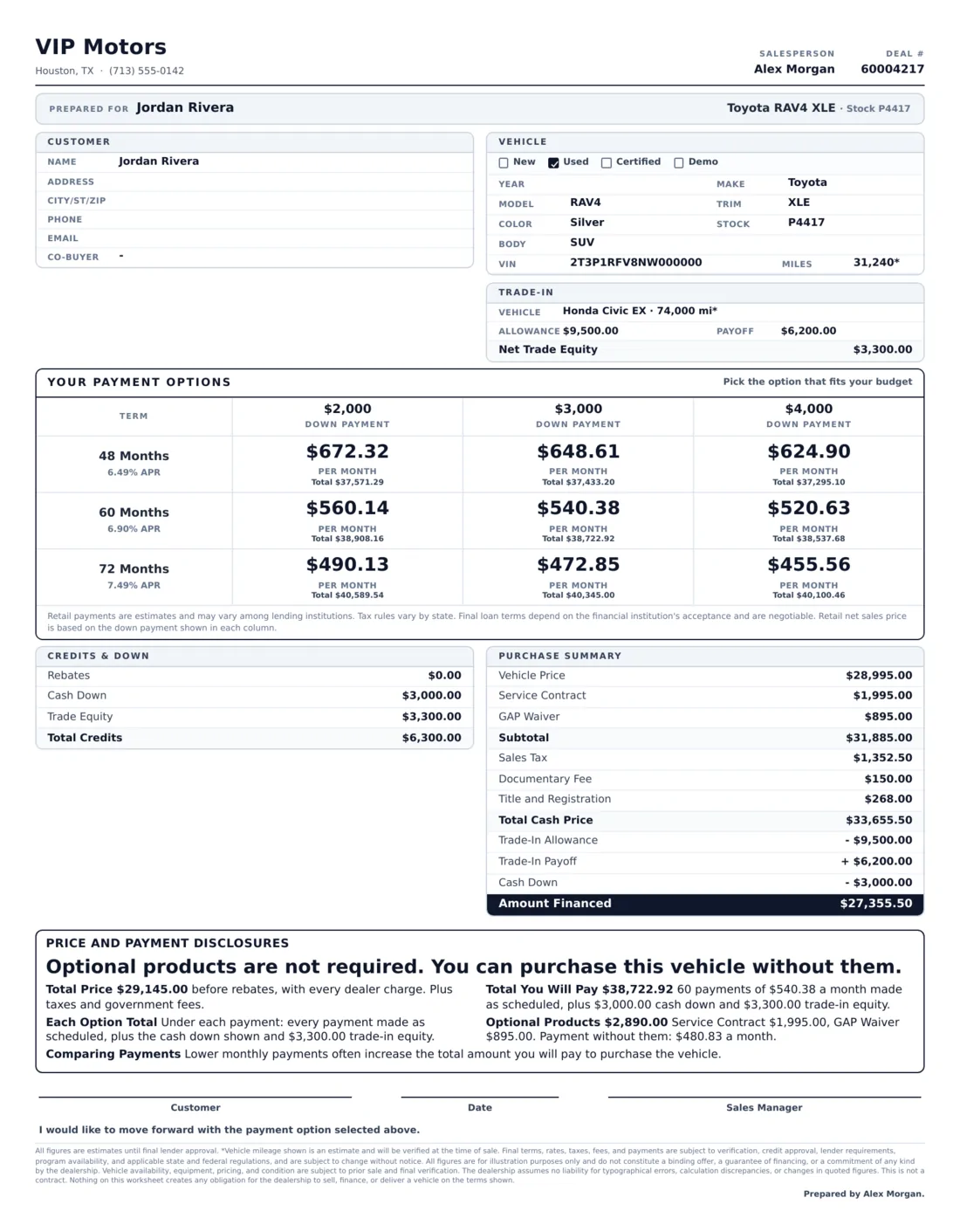
Everything on one simple page
Customer, vehicle and trade on top, nine payment options with the total under each one, and a purchase summary from vehicle price to amount financed. The disclosures box and the signature lines sit at the bottom.
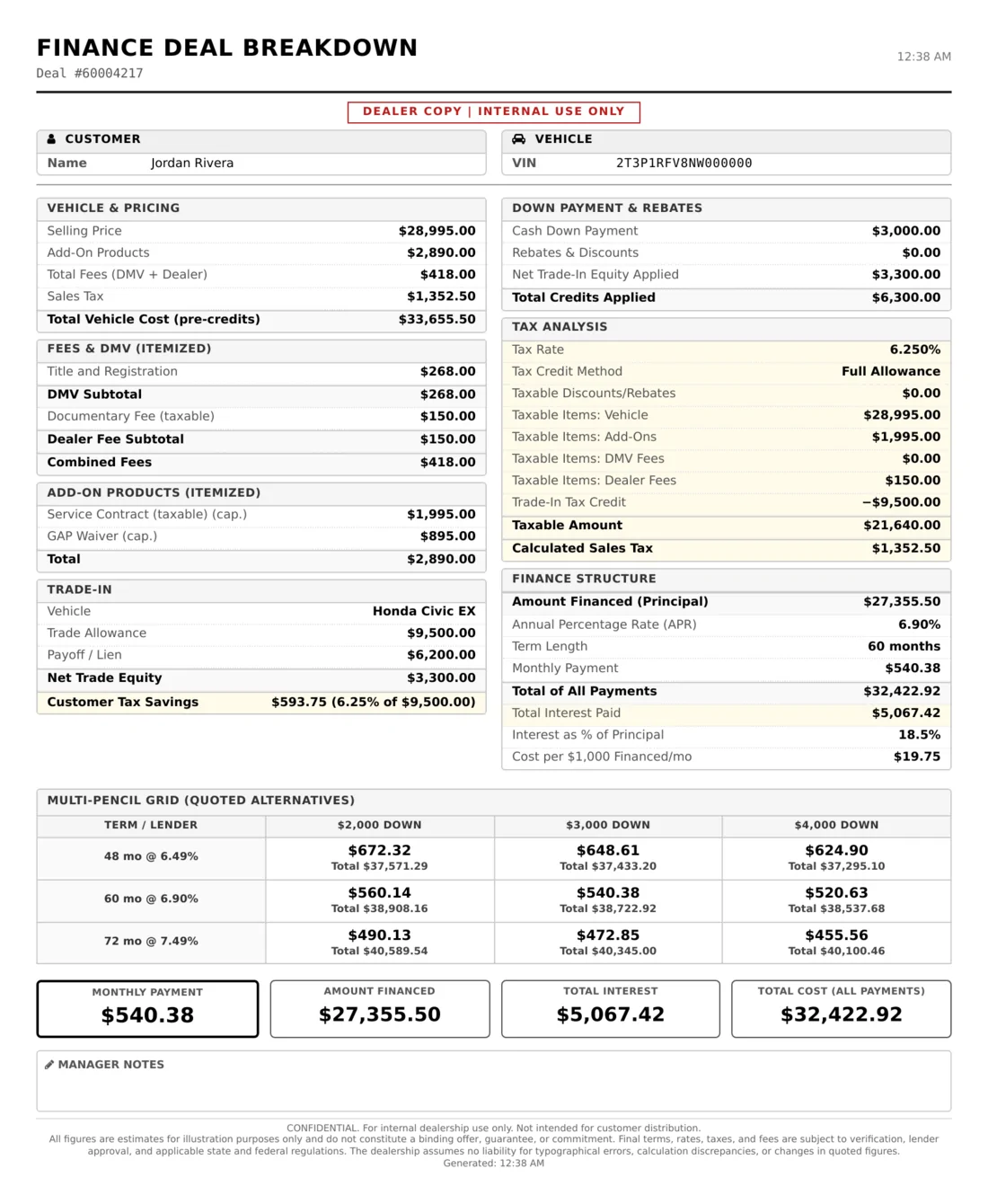
The manager's copy
Two pages for the desk: vehicle and pricing, fees, products, trade, tax analysis, the finance structure with total interest, the full pencil grid and manager notes, then a page with the customer disclosures and a compliance checklist marked OK, CHECK or TO DO.
Price and payment disclosures on every sheet
Every customer sheet your team prints or texts carries a price and payment disclosures box built from the deal itself, so the figures always match the sheet above it. It shows the total price before rebates, the total the buyer will pay after the last scheduled payment with the cash down and trade equity counted, the total under every payment option, and each optional product by name and price with a large type statement that it is not required and the payment without it. Sheets that compare payments add the reminder that lower monthly payments often increase the total paid.
California, handled for you. When the store or the buyer's address is in California, the sheets switch to CARS Act wording and name the statute, used vehicles at $50,000 or less show the 3-Day Right to Cancel with the restocking fee for that vehicle already worked out, and the F&I Desk flags a rate markup past the state limit, a doc fee over the cap and add-ons with special rules while the deal is worked. A store in another state selling to a California buyer gets the same protection on that deal.
When a deal is negotiated in Spanish, one switch in the Print menu adds a Spanish disclosures page behind the sheet, and it prints and texts with it. A busy sheet still prints on one page: the layout tightens, the disclosure box never shrinks. Read every rule in our California CARS Act guide.
What your buyer sees on the phone
When the numbers are ready, send the buyer a private deal page by text, email or both. It opens after a text message verification, carries your logo and your salesperson's contact card, and walks the buyer through five steps: the vehicle, their trade-in with photos and a second trade, payment, documents such as ID, insurance and proof of income or residence, and pick up or delivery with a time that suits them.
The payment explorer lets the buyer slide their cash down and tap a term to see how the payment moves. Their choices are saved as their progress for your team to see, and the desk numbers stay the desk's. You decide which figures the customer summary shows, whether the VIN and stock number appear, whether trade photos are required and when the offer expires. Chat runs on the same page with attachments, typing and read receipts, and Visitor History shows when the buyer came back.
Any sheet can also go out as a shared Pencil Recap. The buyer marks it up with a pencil, highlighter and notes, then signs with Click to Sign. Each sheet takes one signature and locks once signed, the signed copy files itself to the deal, and the salesperson can get a text the moment it happens.
One desking tool for every seat, store and deal
Every seat at the store
- Desk and sales managersPencil grids, goal seek and every deal's gross before it goes out.
- SalespeopleDeals start from the lead, sheets go out by text and a signature sends an alert.
- F&I managersBuy rate, reserve, ratios, stipulations and the Deal Profit and Loss.
- Internet and BDC managersDeal page links, customer chat and visitor history on every online buyer.
- General managers and ownersDeal Defaults, access control and a record of every shared sheet.
Every kind of store
- Franchise new car storesLease programs, security deposits, rebates and manufacturer incentive cards.
- Independent used storesUsed, certified and auction buy conditions, acquisitions and inventory pulls.
- Buy here pay hereIn-house tier, weekly to semi-monthly payments, add-on interest and pick-up payments.
- RV dealershipsMotorhomes and travel trailers on the same four deal tabs.
- Boat dealershipsBoats and their trailers desked with your own fees and products.
- Brokers and partner storesA separate Dealer Profile for each dealership you desk for.
Every kind of deal
- Retail finance and subprimeCredit tiers, co-signers, stipulations and your lender guidelines.
- LeasesClosed-end, one pay and single pay, with programs and deposits.
- Cash buyersBalance due at signing and the same disclosures on the sheet.
- Out of state buyersTrade credit cap and negative equity tax set on the deal itself.
- Spanish speaking buyersA Spanish disclosures page behind any customer sheet.
- Remote and online dealsA private deal page, documents, delivery and signing from the phone.
Access rules and a record of every share
A deal holds the numbers your store lives on, so the desk is built with clear lines. Desking is a page permission you grant per user. Without Account Settings access, Deal Defaults are view only, and withdrawing or voiding a shared sheet is kept for administrators and managers.
The Deal Record on every deal lists each share, view, mark, signature, print, withdrawal and SecureWebX push, sealed against later edits and marked Record verified. Show all opens the full history, and Withdraw all pulls every live link at once. A signed sheet is never overwritten, so it stays exactly as the buyer saw it.
The Internal Deal Jacket keeps the team's files for the deal in one place: upload, rename, rotate and preview, or scan a QR code to add photos from a phone. Documents the buyer uploads on their deal page arrive in the same deal, so the paperwork never lives in an inbox.
Frequently asked questions
What is a desking tool?
A desking tool is the software a sales manager uses to structure a vehicle deal: the selling price, trade-in, rebates, taxes and fees, then the rate, term and down payment that produce the payment options shown to the buyer. LeadLocate's desking tool does all of that inside the CRM, on the customer's own deal record.
Is the desking tool part of the CRM or a separate login?
It is part of the CRM. The desk lives on the deal page, so the lead, the trade, the numbers, the customer chat, the shared sheets and the signatures all stay on one record with one login.
What makes this automotive desking software different?
Most desking software for auto dealers runs as its own program beside the CRM. LeadLocate's automotive desking software is part of the CRM, so the desking tool, the lead, the customer chat, the lender worksheet and the signed sheets share one record, and every deal starts from your own Deal Defaults.
Does the desking tool work in every state?
Yes. The State Tax Setup Helper covers all 50 states and the District of Columbia and sets the trade-in credit method, any credit cap and the lease tax method for your state in one click. The customer's ZIP fills a typical combined rate, your store sets its exact rate once, and each deal can change the trade credit cap and negative equity tax for a buyer registering in another state.
Can it desk buy here pay here deals?
Yes. Buy here pay here stores get an in-house credit tier, weekly, bi-weekly and semi-monthly payments, add-on interest with the true APR disclosed, balloon notes and up to three deferred down payments, each with its own amount and due date.
Can we desk RVs and boats?
Yes. Set your business type to a car, RV or boat dealership and the desk offers the vehicle types you sell, from motorhomes and travel trailers to boats, with the same finance, lease, cash and acquisition tabs.
Can customers see and sign the numbers online?
Yes. Text or email any of five customer sheets, or send a private deal page where the buyer explores payments, uploads documents and chats with your team. Shared sheets can be marked up and signed with Click to Sign, and the signed copy files itself to the deal.
How do deals reach our lenders?
Push the deal to SecureWebX as a lender worksheet. Later pushes update the same worksheet, the attached credit application follows the newest numbers, and the lender figures are worked out from your CRM desk.
Can we set our own fees, products and lenders?
Yes. Deal Defaults hold your tax setup, DMV and dealer fees, add-on products, preferred lenders, lender guidelines, doc fee cap, loan, lease and pencil grid defaults, and Quick Desk choices. Every new deal starts from them.
How does the desk handle the California CARS Act?
When the store or the buyer is in California, customer sheets carry the CARS Act disclosures and statute line, used vehicles at $50,000 or less show the 3-Day Right to Cancel with the restocking fee worked out, and the F&I Desk flags the markup limit, the doc fee cap and add-ons with special rules.
Can my team desk from a phone or tablet?
Desking runs on any computer or tablet. On the phone, the LeadLocate app keeps each deal's offer, customer messages, visitor history, deal chats and deal record at hand.
Desk your next deal inside your CRM
Sign up online, or call 844-376-2274 and we will walk your managers through a deal from the first pencil to the signature.
Prefer to talk right now? Call or text 844-376-2274.


LeadLocate™ All rights reserved. Other product and company names mentioned herein are the property of their respective owners.
Answers to your questions:
LeadLocate is an all-in-one lead generation software and CRM platform. We generate in-market sales leads and provide you with all the tools necessary to sell that customer. All of your leads, texts, calls, emails, deals, and files are available in one place, accessible with a single login.

LeadLocate™ All rights reserved. Other product and company names mentioned herein are the property of their respective owners.
Answers to your questions:
LeadLocate is an all-in-one lead generation software and CRM platform. We generate in-market sales leads and provide you with all the tools necessary to sell that customer. All of your leads, texts, calls, emails, deals, and files are available in one place, accessible with a single login.