


Mon - Sat: 9:00 AM - 6:00 PM
AI for Car Dealerships, With Your People in Charge
AI that follows up with leads, answers your team's questions and drafts messages
- Starts switched off
- Sends as your salesperson
Three ways to let it work
Practice
It writes every message for new leads and keeps them on the page. Nothing reaches a customer, so your team reads its work before any shopper does.
Approve first
It writes the message and a salesperson taps Approve before anything goes out. A draft nobody approves in two hours is skipped, not sent.
Autopilot
It texts and emails on its own inside the rules you set, and hands the conversation to a person the moment one is needed.
One lead, from the ad to the desk

Here is where the AI sits in the life of one lead, from the ad that finds the shopper to the paperwork at the desk.
- Before the lead
Design Studio drafts the ad from a unit on your lot
Its Image Ads tool builds the ad from a vehicle in your live inventory and your factory offers and writes the copy. A person picks the car and decides what runs.
- The first reply
AI Follow-Up answers the new lead
AI Follow-Up texts and emails inside the hours you set, signed by the salesperson the lead belongs to, and offers open times on that salesperson's calendar.
- After hours
The reply at 9 PM gets an answer
A shopper who writes back at night is answered right away, or the store can have the AI wait until it opens. New conversations still start only during store hours.
- The next 30 days
The follow-up keeps going for a month
The default plan sends 10 messages over 30 days, never more than three a day to one shopper, and stops when the lead is sold, lost or marked bad. Pick a gentle, balanced or persistent rhythm, or write your own steps, and any reply from the shopper pauses the plan while the conversation runs.
- The handoff
Price, payments and trades go to a person
A shopper who asks about payments, a trade number or an out the door price goes straight to the salesperson, with an alert by text and by email.
- On the phone
Calls through the CRM are transcribed
Calls placed from the browser phone or made to your tracking numbers are recorded and written out on the lead, and Call Alerts flag the ones that use the words you pick, like trade in or payment.
- At the desk
The desk reads the VIN and the license
Point a phone at a VIN or a driver license and the fields fill in, so the deal starts without anyone retyping a seventeen character number.
What the AI writes, in your salesperson's name
This is the Test it panel on the AI Follow-Up page, working for the demo store. It wrote the first text to a sample shopper named Jordan, signed by John, the salesperson on the lead, about a Kia K4 the store has in stock, with the stop line at the end. Then Jordan asked for the best price.
It did not quote a number or haggle. It told Jordan that John would go over the pricing himself and stepped back. John got a note with what Jordan asked and a suggestion to work toward an appointment, and in a live conversation the AI stays out of it from there.
Test it uses your own settings and a vehicle from your own inventory, and nothing it writes reaches anyone. Type the questions your own shoppers ask before you switch anything on, or pick a real lead and see what it would write to that person. Switch the panel from Text to Email to read the same conversation as an email.
When it steps aside for a person
Eleven things send a conversation straight to the salesperson, and five lead statuses end the follow-up for good. These are the defaults on each account, and a manager can tighten any of them.
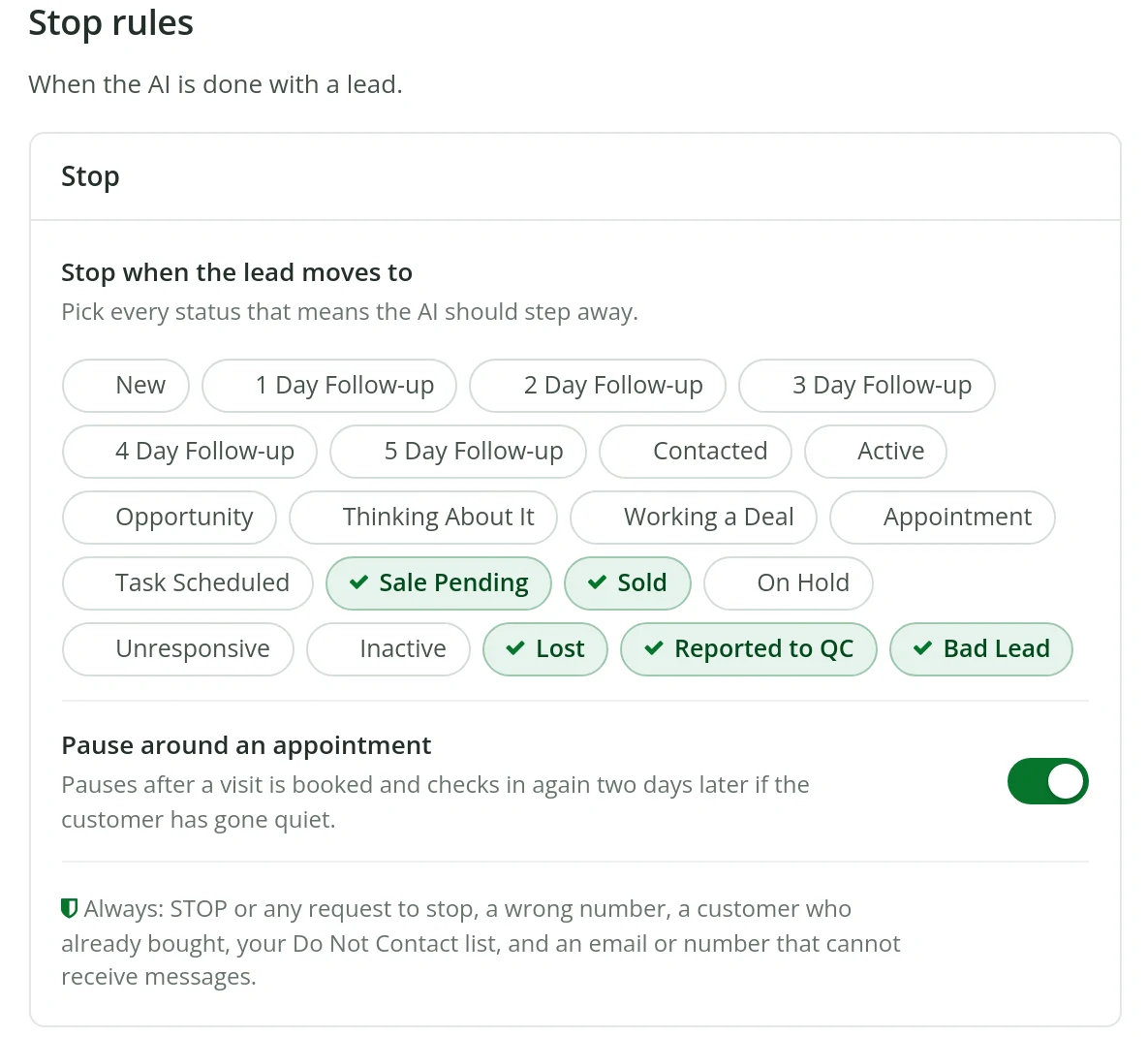
Swipe to see the whole screen
It also leaves alone anyone who replies stop, a wrong number, a customer who already bought, your Do Not Contact list and any number or address that cannot receive messages, and its first text to a new lead says how to stop. If nobody picks up a handoff in thirty minutes, the managers you name hear about it.
Money talk goes to the salesperson
- Negotiating price or an out the door number
- What a trade is worth
- Payments, rates, approval or credit
- Saying they are ready to buy
So does a shopper who wants a person
- Asks for a person, a manager or a call
- Books an appointment
- Sends photos
- Is upset or has a complaint
- Mentions a lawyer, a lawsuit or a regulator
Or a conversation that is stuck
- A question it cannot answer for sure
- Several messages with no progress
It stops for good when the lead is
- Sold
- Lost
- A bad lead
- Reported through Report an Issue
- A pending sale
It always keeps to
- The hours you set
- Three new messages a day to one shopper
- The holidays you close for
- A pause around a booked appointment
What the AI knows about your store
AI Follow-Up speaks only from your facts: your live inventory, your store details and the answers you give it. When it is not sure, it hands the shopper to the salesperson instead of guessing. Because it reads the inventory, its messages talk about the vehicle the shopper asked about and the units you actually have, and it quotes a price only as it is listed in your feed, or never if you set it that way. When it mentions a vehicle, the link goes to the salesperson's own inventory page, with the photos and features from your feed.
You add the rest in plain words: the offers running this month, the questions shoppers ask most and your answers, the things it should never mention, and anything particular to the store, like Saturday hours or a delivery area. Choose a friendly, professional or casual tone, short or medium messages, and whether emoji are allowed. On a trade it invites an appraisal and on financing it shares your credit application, or you can send both straight to the salesperson. Under Your answers you add a question shoppers ask and the exact answer you want, and it uses your words whenever the question fits. A shopper who writes in Spanish gets an answer in Spanish.
Jax, the AI assistant at every desk

Jax is the AI assistant built into the CRM. It sits in the taskbar on every screen, so a salesperson can type or speak a question without leaving the lead in front of them. The answer above is a real one, with the exact clicks.
Ask where the booking link lives, how to send a vehicle by text or how to set up a lead feed, and Jax answers with the steps for LeadLocate's own screens. It understands English and Spanish and replies in the language the salesperson used, the microphone takes a spoken question, and the whole team can ask it inside Team Chat. Jax answers your people, not your customers.
Writing help that stays in the salesperson's hands
The AI writing assistant drafts texts and emails in the composer, fills in the customer's name and vehicle with AI merge fields, and takes voice dictation. The salesperson reads the draft, changes what they like and presses send.
Many AI tools for car dealers write in a separate app, so every message has to be copied and pasted into the CRM. Here the writing happens in the same composer that sends the message and logs it on the lead, and an inventory message carries the salesperson's own inventory link.
Design Studio writes the copy for image ads, GIF ads and video reels built from your inventory and offers, and the Inventory Link site builder drafts the copy for a salesperson's own inventory website.
What managers control
A manager decides who the AI works for, by salesperson and lead source. In Approve first, the manager also chooses who approves each draft, the salesperson, the managers or both, and whether a draft nobody answers in 120 minutes is skipped or sent. The salesperson on the lead gets each draft by text, so approving one takes a tap from the showroom floor.
The AI Follow-Up page reports what it did: the leads it engaged, the customers who replied, the appointments it booked and the conversations it handed to salespeople, over seven, thirty or ninety days and by salesperson. Every save is kept in the change history with a Restore button, so a setting changed on Saturday can be put back on Monday, and Access Control decides who in the store can open each tool.
Putting AI for car dealerships to work at your store
AI Follow-Up is ready on each LeadLocate account and starts switched off. Turn it on in Practice and read a few days of drafts on your own leads. Ask three things of each draft: does it sound like your team, does it hand off where you would, and does it know your inventory. Adjust the tone, the instructions or the handoff words until the answer is yes, then move to Approve first, and to Autopilot once the salespeople stop changing the drafts.
Switching it on does not reach back into old leads on its own. New leads join as they arrive, so a customer from last spring does not hear from it out of nowhere. A manager can also bring in open leads from a set number of recent days that nobody has worked by hand in the last three days, and choose to start on them.
Your account manager walks the team through the settings on the live training call. Jax and the writing assistant are there from the first login, inside the same automotive CRM, so nobody learns a second system.

Questions? Request a Call Back
Leave your number and a lead specialist calls you back to answer your questions about pricing, coverage, and setup. Mon - Sat, 9:00 AM - 6:00 PM Pacific.
Prefer to talk right now? Call or text 844-376-2274.
Plans with AI built in
Month to month on each plan

REAL-TIME
INBOUND LEADS
Month-to-Month Service
✅ Inbound Plans include integration with our advertising feeds that generate leads for you.
Generate fresh sales leads, get a personal website, capture leads through a referral link, automate marketing, and more.
MARKETPLACE
ACQUISITIONS
Month-to-Month Service
✅ Acquisitions Plans include ad campaigns that bring offer requests from local car sellers.
Includes everything you need to buy vehicles direct from local owners who asked for an offer, then retail or wholesale them.
BUYERS & SELLERS
HYBRID PLAN
Month-to-Month Service
✅ Hybrid Plans include 1x Buyer Effort + 1x Seller Effort every month.
Buy cars from local owners and sell to in-market buyers, with both lead types in one CRM pipeline.
Frequently Asked Questions
How are the AI's messages signed?
With the name of the salesperson the lead belongs to, in your store's tone. If a shopper asks who they are talking to, the AI sends nothing and the salesperson answers personally.
Will AI replace our BDC or salespeople?
No. It takes the first reply, the reminders and the long tail of follow-up, then hands the shopper to a person for price, payments, trades and the sale itself, so your people spend more of the day with shoppers who are ready to talk.
What happens after a handoff?
The salesperson owns the conversation from there and the AI stays out of it, unless the store sets it to pick back up after a week of quiet.
Does it work in Spanish?
Yes. AI Follow-Up answers a shopper who writes in Spanish in Spanish, and Jax answers each salesperson in the language they used.
Which leads does it work?
By default every salesperson and every lead source. A manager can limit it to the salespeople and sources you choose.
Can we see what it writes before it sends anything?
Yes. Test it writes to a sample shopper with your settings, and Practice drafts messages for your real leads without sending any of them.
See the AI work on your own leads
Ask for a call back and we will walk your team through Practice on your own leads, or pick a plan on the pricing page and start month to month.
Prefer to talk right now? Call or text 844-376-2274.


LeadLocate™ All rights reserved. Other product and company names mentioned herein are the property of their respective owners.
Answers to your questions:
LeadLocate is an all-in-one lead generation software and CRM platform. We generate in-market sales leads and provide you with all the tools necessary to sell that customer. All of your leads, texts, calls, emails, deals, and files are available in one place, accessible with a single login.

LeadLocate™ All rights reserved. Other product and company names mentioned herein are the property of their respective owners.
Answers to your questions:
LeadLocate is an all-in-one lead generation software and CRM platform. We generate in-market sales leads and provide you with all the tools necessary to sell that customer. All of your leads, texts, calls, emails, deals, and files are available in one place, accessible with a single login.