


Mon - Sat: 9:00 AM - 6:00 PM
Car Dealership Marketing and Automotive Marketing Software
Ads, lead capture, follow-up and reports for dealers and salespeople
- Campaign leads go only to your store
- Month to month, no long term contract
Run it yourself, or with our team
Your team runs
- Ads made from your inventory in Design Studio
- Keyword texting, website forms and the booking link
- Texts and emails to your own customer list
- Follow Up Processes and Reports
Our team runs
- Paid campaigns, built from the settings you save in Leads Manager
- The webXintel Ads Network, the ad network we manage
- Your inventory feed and lead feeds
- Account setup, an account manager and live training
Car dealership marketing that starts with your inventory

A shopper scrolling past a stock photo of a sedan keeps scrolling. A real unit from your lot with a real offer on it gives them a reason to stop. Your ads start from the inventory already in LeadLocate, and factory programs for your ZIP refresh on their own each month in Inventory Link, so your team quotes the current program instead of last month's.
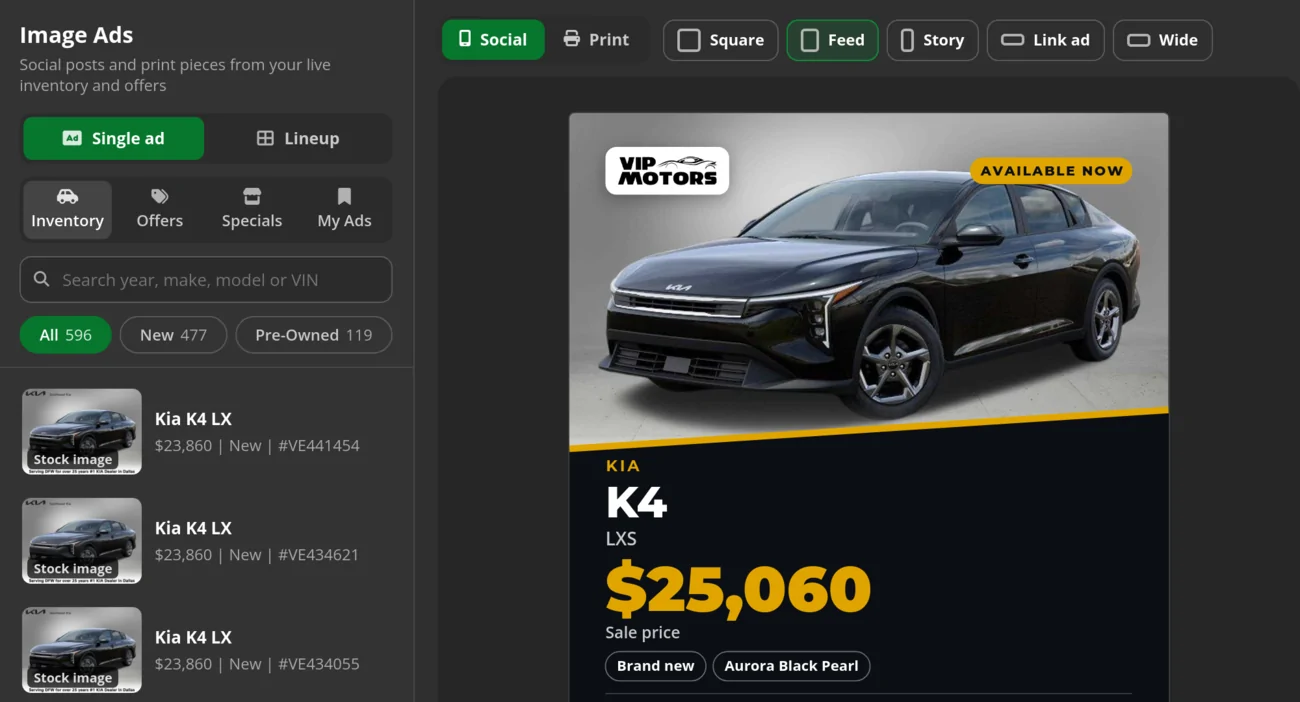
Image Ads
Design Studio Image Ads builds an ad from a unit in your live inventory and your OEM offers. It writes the copy, sets the scene and adds your logo, in social sizes and print ready sizes. Lineup ads put several vehicles in one piece.
- Social and print ready sizes
- Your logo and your offers
- Lineup ads for several units
GIF Ads
GIF Ads add motion in sizes made for a text or an email. Text it to a lead opens the composer with the ad attached, ready for the salesperson to send.
- Sized for texts and emails
- Attached from the ad in one step
Video Reels
Video Reels turn the same inventory and offers into MP4 reels for the social feeds your shoppers scroll, so a fresh trade gets more than a row of photos on a listing.
- MP4 files you can post anywhere
- Built from your units and offers
Marketplace listings
From the car view in the CRM, the Inventory Link browser extension fills in a Facebook Marketplace listing with the unit's photos and details. The salesperson reviews it and publishes it from their own account.
- Filled in from your inventory
- No passwords asked for
Your customer list
Bulk Texting and Bulk Email send one message to a whole list of your own customers, like a new arrival or a service special, and Voicemail Drops leave a message recorded in your own voice. Scheduled Messages lets a salesperson write it now and send it later, and a manager sees the team's queue in one panel. Save list sends for news worth hearing. A store that holds its biggest sale every weekend teaches people to tune it out.
- Do Not Call numbers marked Will not send
- The whole queue in one panel
Paid campaigns our team runs in your market
Plans with leads are sold by Marketing Effort Level: the advertising exposure and campaign work we put behind your settings, never a number of leads. You decide where and for whom, and we do the building and the running. Before you sign up, the Forecasting Tool takes the same targeting choices and gives you a planning forecast for your market.
- Step 1
Set your market
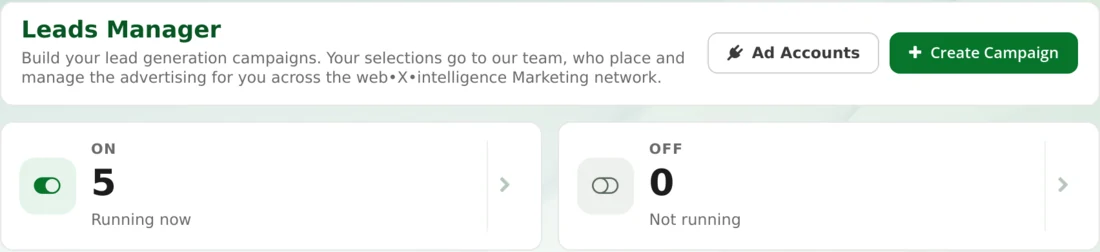
In Leads Manager, choose the Market Area (the area around your store where the ads run), the campaign type and the prescreening questions each shopper answers.
- Step 2
Add your offers
Put Custom Offers beside your units and preview sample ads with See Samples before anything runs.
- Step 3
We build and run it
Our team builds the campaigns from those settings and runs them in the ad network we manage, or in your own ad accounts on request.
- Step 4
Leads come to you
Each lead lands in your CRM with its answers and LeadLocate as its source, for your store only. A lead that turns out bad can be flagged with Report an Issue for a replacement review.
Give shoppers an easy way to reach you
Marketing that makes a shopper work to reach you back leaks money. Each of these lands in the CRM as a lead with its source, and an automated first text can answer before the shopper has put the phone down.
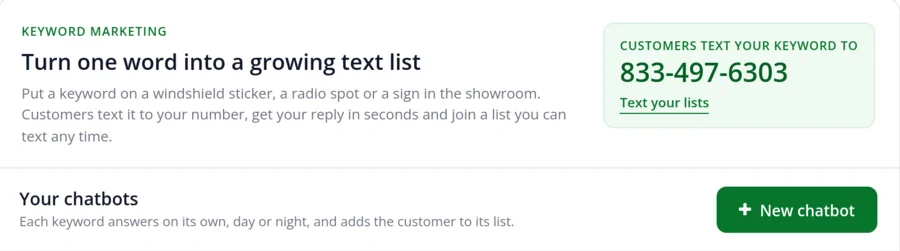
- Keyword
A word on a sign starts a conversation
Put a word like TRUCK on a windshield sticker, in a radio spot or on a showroom sign. Texting Chatbots answer the shopper who texts it within seconds and add them to a list for your next offer.
- Website form
Forms post straight into the CRM
Your account has its own form intake link. A form on your website or a Lead Page posts in as a lead with the fields mapped.
- Booking link
Shoppers pick their own time
Each salesperson can run a personal website with their own inventory, and the booking link in Calendar Settings lets a shopper choose a time inside the hours you set.
- Call tracking
Each source can have its own number
A lead source can carry its own tracking number, and calls are recorded and transcribed beside the lead, so nobody has to ask how the shopper heard about you.
- Referral
Customers send you their friends
The Referral Program gives each customer a referral code and pays gift card style rewards to the ones who send you a buyer.
- Print and QR
Cards and codes that point somewhere
Design Studio prints business and referral cards, and the Files menu turns a brochure or a walk around video into a QR code any phone can open.
Follow-up that keeps going after the first text
The first reply is the easy part. The sale often goes to whoever is still in touch on day ten, after the other store has stopped calling. Follow Up Processes start on their own when a lead's status changes, or when an appointment is marked Completed or Missed, and each step lands on the salesperson's Workspace as a call, a text or an email at its set time. With Auto Send on Yes the template goes out on schedule. With it on No, the salesperson works the task by hand.
Hot Lead, Contacted, Missed Appointment, Sold Thank You and Long Term Follow Up 6 Month come with the account beside the process below, and you can edit any of them or add your own. AI Follow-Up is ready on each account as well. A manager switches it on in Practice, where it writes each message and sends none, Approve first, where a salesperson approves each one, or Autopilot.
New Lead 14 Day Follow Up, the default steps
- Day 0
Call, text and email
- Hour 6
Second call
- Day 1
Call, text and email
- Day 2
Call and text
- Day 4
Text
- Day 6
Call
- Day 8
Text and email
- Day 10
Call
- Day 12
Text and email
- Day 14
Call, text and email
- Then
Closes as Lost: Lead Process Completed
Know which source sold the car
The marketing meeting always comes down to one question: what worked? In most auto dealer marketing, the ad report says the campaign worked, the sales board says it did not, and nobody can settle it while the click, the conversation and the sale live in different systems. In LeadLocate they sit on one customer record, and Reports reads them for any date range, for one salesperson or, with Whole Team View access, the whole floor.
| The question | Where the answer is |
|---|---|
| Which sources brought leads? | The Leads tab, by source and by status, over any date range |
| Which leads became visits and sales? | The Appointments and Deals tabs |
| Who talked to shoppers, and how much? | Communications: texts, emails, calls and voicemails in both directions, with total talk time |
| Which calls mentioned a trade in or a payment? | Call Alerts, which flag recorded calls that use the words you pick |
| Who is pulling their weight? | The Users tab, a scoreboard for each person |
| Which link in a text got opened? | Short links, which count their clicks |
Source tracking starts on day one, because each lead source gets its own feed in Lead Targeting. When the month closes, the budget moves toward what sold cars instead of what collected clicks, and nothing has to be retyped for the Monday meeting. Each lead LeadLocate delivers carries LeadLocate as its source, so paid campaigns sit on the same scoreboard as your website and your radio spot.
Automotive marketing for your kind of store
The same tools carry different weight on a franchise row than on a buy here pay here lot. This is where each kind of store starts.
Franchise dealership
Image Ads and rooftop routing Image Ads pull factory offers beside your units, and leads route by rooftop for groups with more than one store. LeadLocate for franchise stores
Independent dealer
Inventory Link No feed yet? Inventory Link imports your vehicles from your website, so your ads and inventory texts show what is on the lot.
Used car store
Marketplace Acquisitions Seller leads from local owners who asked for an offer, so your marketing brings in cars to sell as well.
Buy here pay here
Financing campaigns Campaigns run under fair lending rules, and your customer list hears from you between cars. LeadLocate for buy here pay here
RV and motorhome dealer
Long Term Follow Up and Video Reels The six month process fits a long decision, and reels show units off between visits. RV dealer leads and marketing
Boat and marine dealer
Seasonal sends Bulk Email and Bulk Texting tell past buyers when the new models are in, and Follow Up Processes keep each shopper warm through the off season.
Credit union buying program
A feed and an apply link per program Each program gets its own lead feed and branded SecureWebX apply link, and applications go to the credit union through Send to Lender. Credit union buying programs
Auto broker
Auto broker inventory mode No lot needed: it connects brand offer pages, and Dealer Profiles save the deal defaults for each partner dealership.
Individual salesperson
Your own website and cards A personal website, a booking link and an inventory link, plus business and referral cards from Design Studio.

Questions? Request a Call Back
Leave your number and a lead specialist calls you back to answer your questions about pricing, coverage, and setup. Mon - Sat, 9:00 AM - 6:00 PM Pacific.
Prefer to talk right now? Call or text 844-376-2274.
Plans for dealers and salespeople
Month to month on each plan

REAL-TIME
INBOUND LEADS
Month-to-Month Service
✅ Inbound Plans include integration with our advertising feeds that generate leads for you.
Generate fresh sales leads, get a personal website, capture leads through a referral link, automate marketing, and more.
MARKETPLACE
ACQUISITIONS
Month-to-Month Service
✅ Acquisitions Plans include ad campaigns that bring offer requests from local car sellers.
Includes everything you need to buy vehicles direct from local owners who asked for an offer, then retail or wholesale them.
BUYERS & SELLERS
HYBRID PLAN
Month-to-Month Service
✅ Hybrid Plans include 1x Buyer Effort + 1x Seller Effort every month.
Buy cars from local owners who asked for an offer and sell to in-market buyers, with both lead types in one CRM pipeline.
Frequently Asked Questions
Is LeadLocate car dealer marketing software or a marketing agency?
Both, in one account. The marketing tools live in the CRM your team already works, and our team builds and runs your paid campaigns from the settings you save in Leads Manager.
What makes car dealership marketing different from other local advertising?
A dealership sells one particular vehicle, usually with a trade, a payment and a lender in the deal, and the buyer often takes weeks to decide. The marketing has to show real units, capture the shopper quickly and keep following up by text, call and email until the deal closes. That is why LeadLocate runs it from the CRM.
Do we need an inventory feed or DMS access to start?
No. Inventory Link takes your inventory feed if you have one, or imports your vehicles from your website, so your ads and inventory texts show the units on your lot. LeadLocate works alongside your DMS, and accounting, payroll and title work stay there.
What happens in the first week?
Your account manager walks you through the account, and the welcome guide arrives at sign up. Our team connects your vehicles through Inventory Link, sets up a feed in Lead Targeting and a tracking number for each lead source, gives you the link your website forms post to, and books live training. From you we need your website address, your targeting saved in Leads Manager, the first and last name of each person who will log in, and your customer list in whatever file your last CRM or DMS exports.
Are the leads from our campaigns shared with other dealers?
No. Every lead goes to your store only. Campaigns ask your prescreening questions at capture, every lead shows LeadLocate as its source, and a lead that turns out bad can be flagged with Report an Issue for a replacement review.
How is LeadLocate billed?
Month to month, with no long term contract. The bill has three parts: your plan, any users added beyond the first login, and usage credits bought in prepaid packs for bulk texts, bulk email, voicemail drops to a list and phone or email validation. Texts, calls and emails to one customer at a time come with the plan. The pricing page lists each plan and pack.
Can a single salesperson use these tools for their own marketing?
Yes. A salesperson can run a personal website and a booking link, send their own inventory link in every inventory message, and print business or referral cards from Design Studio. Each plan includes a login to start, and a single user account has full access to every tool on it.
Put the ad, the follow-up and the sale in one place
Ask for a call back and we will walk through your market, your inventory and your follow-up with you, or pick a plan on the pricing page and start month to month.
Prefer to talk right now? Call or text 844-376-2274.


LeadLocate™ All rights reserved. Other product and company names mentioned herein are the property of their respective owners.
Answers to your questions:
LeadLocate is an all-in-one lead generation software and CRM platform. We generate in-market sales leads and provide you with all the tools necessary to sell that customer. All of your leads, texts, calls, emails, deals, and files are available in one place, accessible with a single login.

LeadLocate™ All rights reserved. Other product and company names mentioned herein are the property of their respective owners.
Answers to your questions:
LeadLocate is an all-in-one lead generation software and CRM platform. We generate in-market sales leads and provide you with all the tools necessary to sell that customer. All of your leads, texts, calls, emails, deals, and files are available in one place, accessible with a single login.